
Table Of Contents
10 Cinematic AI Photo Prompts That Instantly Improve Image Quality
Published on : May 28 2026

A lot of AI images look flat, like really flat, because the prompts behind them are flat too. There's no lighting direction, no real camera feel, no mood, sort of. The model guesses along the way, and then you end up with a generic result. If you want to fix that from the ground up, checking out the best AI image generators available right now is a solid starting point before you even write your first prompt.
Cinematic AI photo prompts help with that.
They basically tell the model how to light the scene, how to frame the shot, and how to shape the atmosphere. In this guide, you get 10 ready-to-use cinematic prompts plus the whole breakdown of what makes each one click.
Quick Summary
- What you will learn: How to write prompts that produce high-quality, cinematic AI images
- Tools covered: Midjourney, Flux, DALL-E, Stable Diffusion
- Beginner-friendly: Yes, every prompt is copy-paste ready with clear explanations
- Reading time: Approximately 10 to 12 minutes
What Are Cinematic AI Photo Prompts?
Cinematic AI photo prompts are basically detailed text instructions that tell AI image generators what to make, with film-quality lighting, realistic depth, a rich atmosphere, and a deliberate mood or vibe. They sort of go past the simple thing of "just describe the subject," and instead they add camera language too, plus hints for color grading, and ways to build visual storytelling, as it comes from professional photography and also filmmaking.
10 Cinematic AI Photo Prompts
1. Cinematic Portrait
The most potent way to use AI image generation is portraiture. If you write a well-crafted portrait prompt, you end up with pictures that just look like they belong to a high-end editorial shoot, you know. It's kind of a small thing, but the results feel oddly precise, and in a good way.
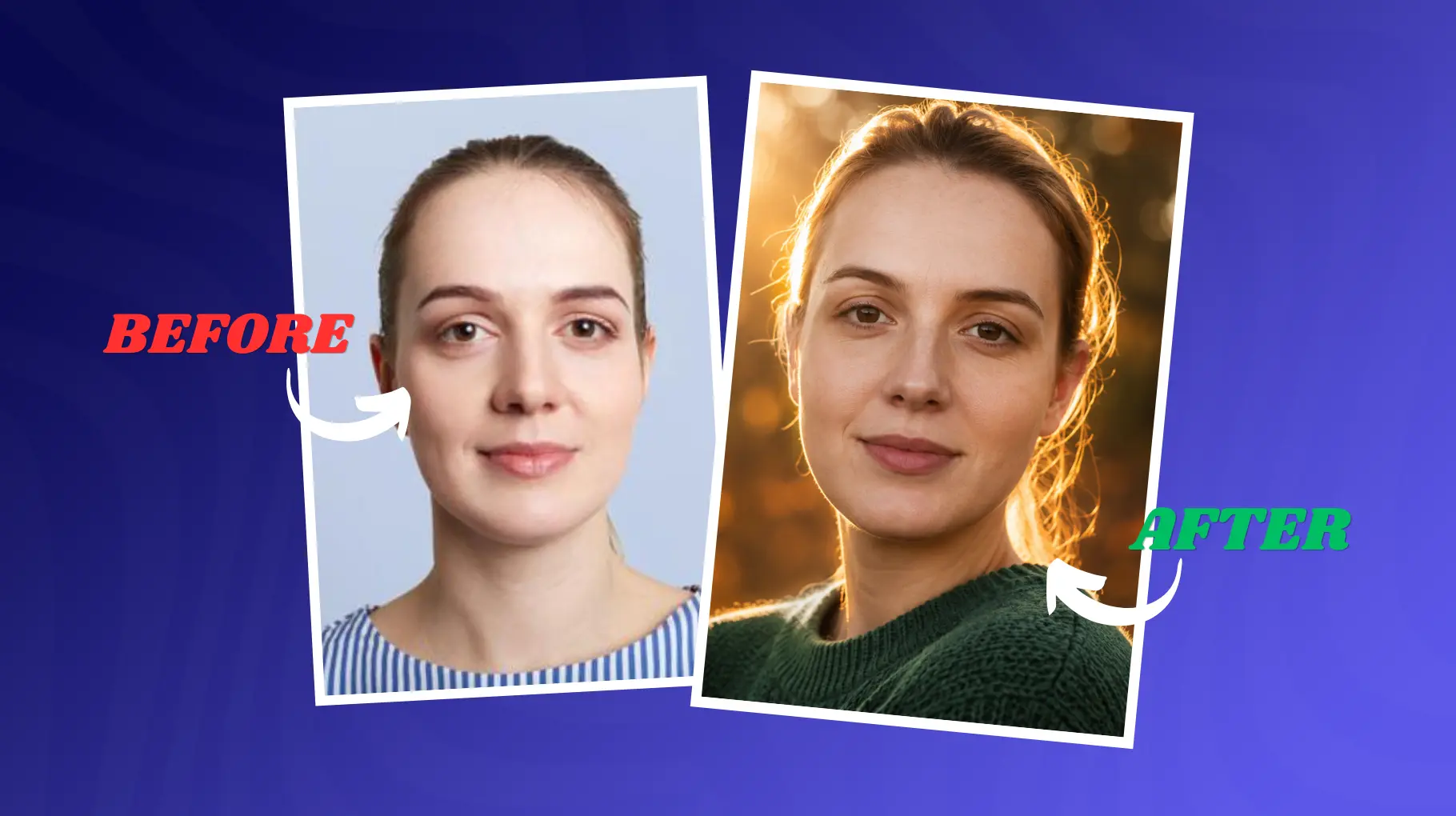
Close-up portrait of a young woman with deep brown eyes and natural skin texture, soft freckles, and windswept hair. Shot outdoors at golden hour, warm rim lighting from behind separates her from a softly blurred bokeh background of autumn trees. 85mm f/1.2 lens, shallow depth of field. Editorial fashion photography style. Warm, intimate, emotionally resonant mood. Ultra-realistic skin texture, 8K detail, cinematic color grade with warm highlights and cool shadows.
Why it works: The rim lighting creates that glowing halo effect you see in film stills. The 85mm lens reference compresses the background naturally. Mentioning skin texture pushes the model to render micro-detail rather than smooth plastic skin.
2. Cyberpunk City
Cyberpunk is one of AI's strongest genres, but if you give it generic prompts, you get generic results, you know? This version is more specific, in a way that it actually feels like a real film frame, not just some random output.
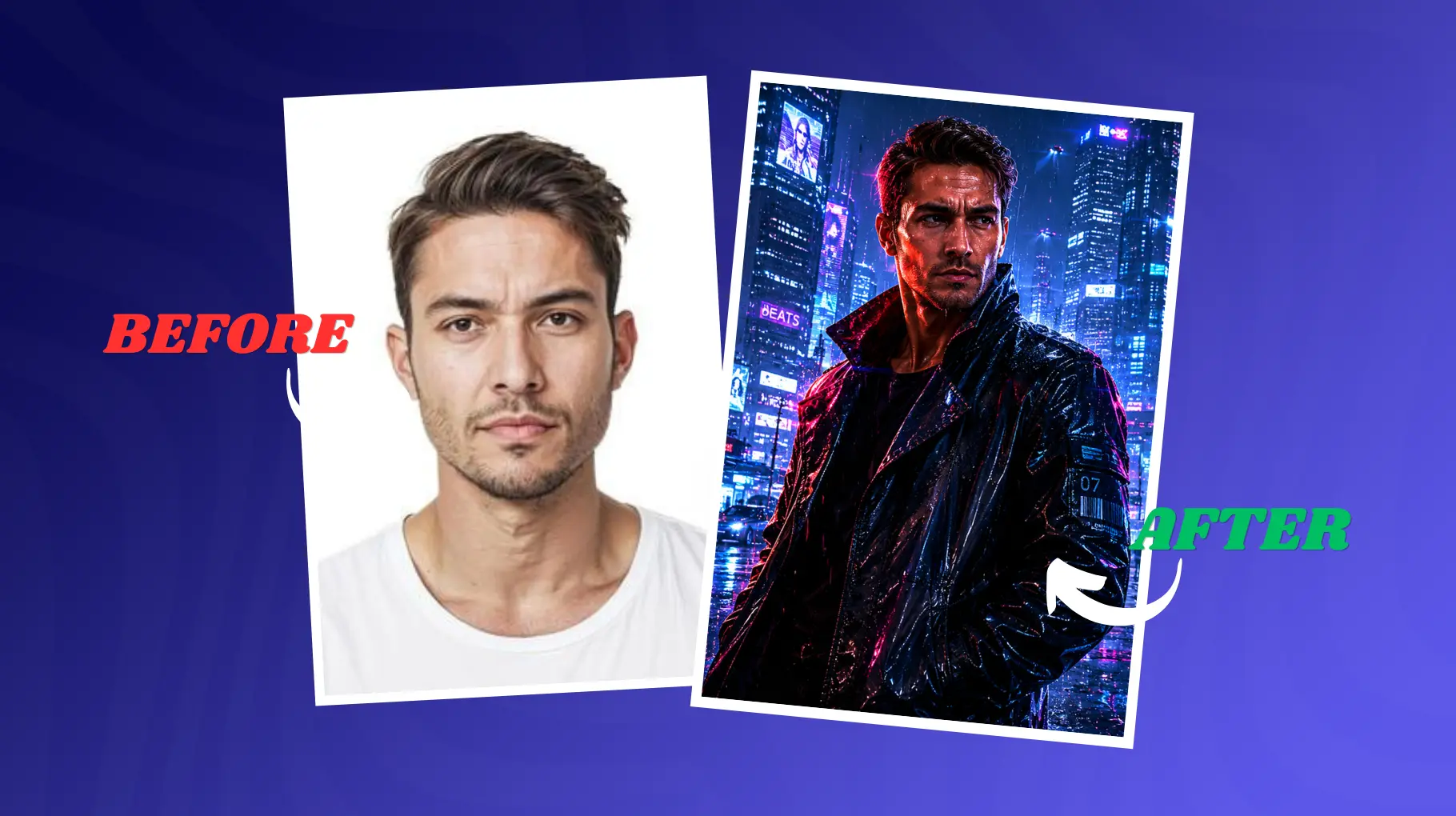
A lonely figure in a reflective black jacket, walking through a rain-soaked cyberpunk megacity at night, sort of like they are on purpose but also not. Everywhere, towering neon-lit skyscrapers, and holographic advertisements bouncing back off the wet street like a bad echo. It's shot low angle, wide anamorphic lens, cinematic horizontal lens flares that kind of smear, and the whole thing sits in that Blade Runner vibe, tension in the air, solitude you can almost touch, urban dystopia mood, you know. Volumetric light beams cut through the rain, 8K ultra detail, and photorealistic rain reflections that look painfully real.
Why it works: The anamorphic lens reference produces those iconic horizontal lens flares seen in real film production. Specifying the exact neon colors prevents the model from defaulting to a muddy, oversaturated mess.
3. Luxury Fashion Photography
Fashion AI prompts really need some restraint and also a bit of precision. If you start over-describing the clothes, you can end up with garments that get all distorted, kinda wrong. So this prompt is not about filling every detail; it is more about the mood and atmosphere, like the overall feeling. For creators working on brand visuals, pairing these prompts with the right AI image tools for marketing and branding can take results even further.
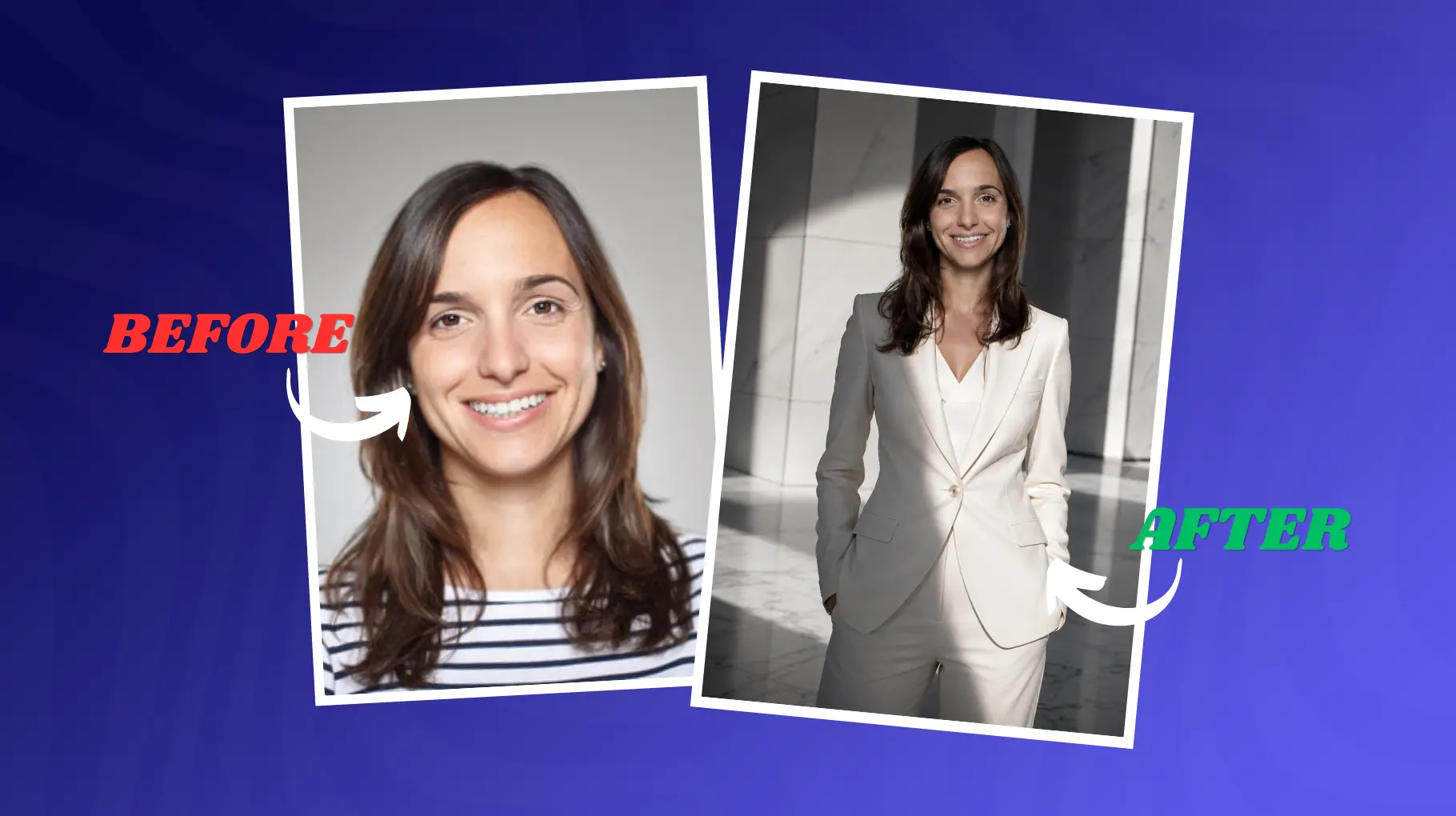
A tall woman in a tailored ivory structured blazer standing in a minimalist white marble lobby. Harsh directional overhead lighting creates dramatic shadows. Shot with a medium format camera feel, 65mm equivalent lens, slight underexposure for a luxury editorial look. Monochromatic color palette with subtle warm skin tones. High fashion Vogue editorial style. Cool, confident, architectural mood. Ultra-sharp fabric texture detail, 8K, cinematic color grade.
Why it works: Mentioning "medium format camera feel" tells the model to simulate the distinct look of Hasselblad or Phase One cameras used in real luxury fashion photography. The marble lobby grounds the scene in aspirational visual language.
4. Dark Moody Photography
Low-key lighting and controlled shadows are what separate moody photography from underexposed mistakes. This prompt gets the balance right.
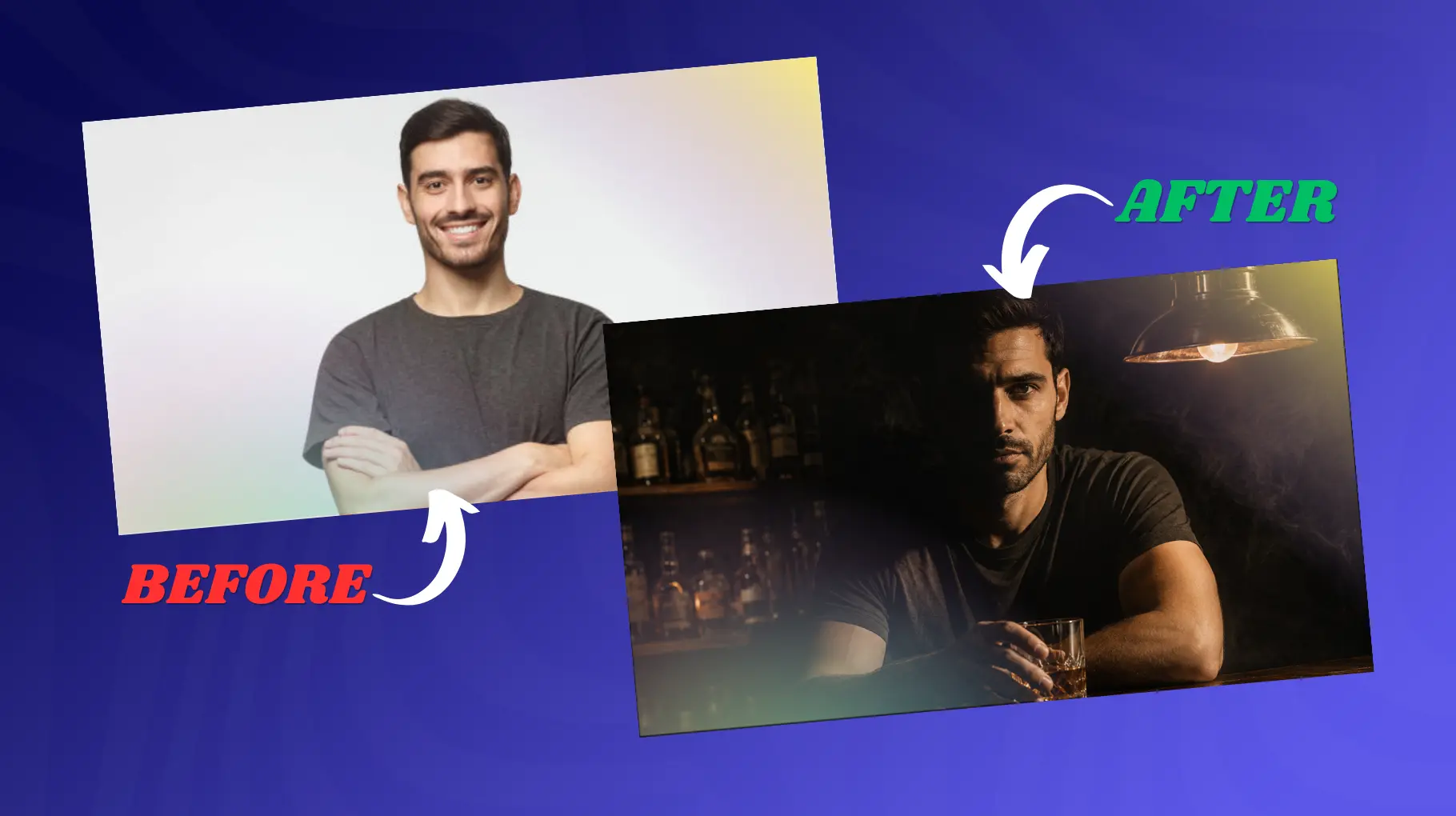
A man sitting alone at a bar, half his face in deep shadow, holding a glass of whiskey that catches a single shaft of light. Chiaroscuro lighting, single practical light source from a vintage pendant lamp above. 50mm lens, medium depth of field. Desaturated color grade with warm amber tones in the highlights. Film noir meets contemporary drama. Lonely, contemplative, cinematic tension. 8K, ultra-realistic glass texture, smoke in the air, analog film grain overlay.
Why it works: Chiaroscuro is a kinda specific art direction term the model understands, so it can latch onto the visual vibe more easily. Also mentioning "practical light source" like a lamp helps create motivated lighting; it tends to look natural, not like a flat studio-lit scene.
5. Fantasy Cinematic Scene
A lot of fantasy prompts end up being too much, kind of cluttered, you know. The tricky part is how to hold on to the marvelous stuff without losing the overall look. Try grounding everything with photorealistic rendering techniques, like really anchoring it instead of just going wild. If you want to explore more styles across different tools, looking into an AI anime generator can open up some really interesting creative directions alongside this kind of fantasy work.
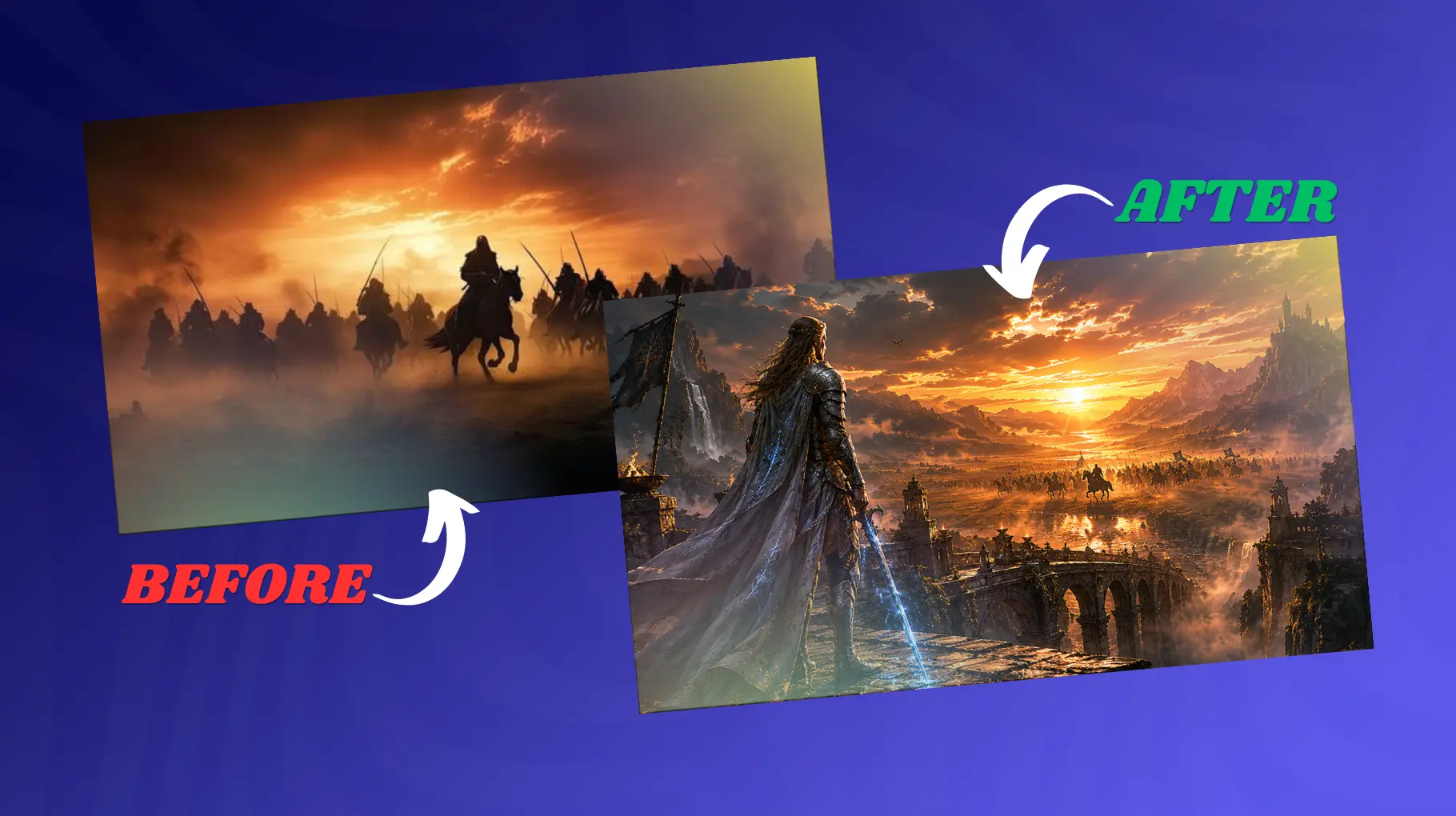
A lone elven warrior standing at the edge of an ancient stone bridge over a misty gorge, wearing intricately detailed silver armor with glowing blue runes. Soft diffused light filtering through heavy fog, god rays breaking through the mist above. Wide angle cinematic lens, deep depth of field showing the vast landscape behind. Epic fantasy film aesthetic, Peter Jackson color palette. Awe, solitude, ancient power mood. Ultra-detailed armor texture, 8K, photorealistic fantasy render, cinematic grade.
Why it works: God rays through fog is a specific atmospheric phenomenon that the model renders beautifully. Referencing Peter Jackson's color palette gives the model a cinematic framework rather than leaving style interpretation open-ended.
6. Sci-Fi Environment
Environmental storytelling without a human subject can be pretty powerful, like surprisingly so. This prompt makes a place that feels more lived in and real, even if nothing is standing there.
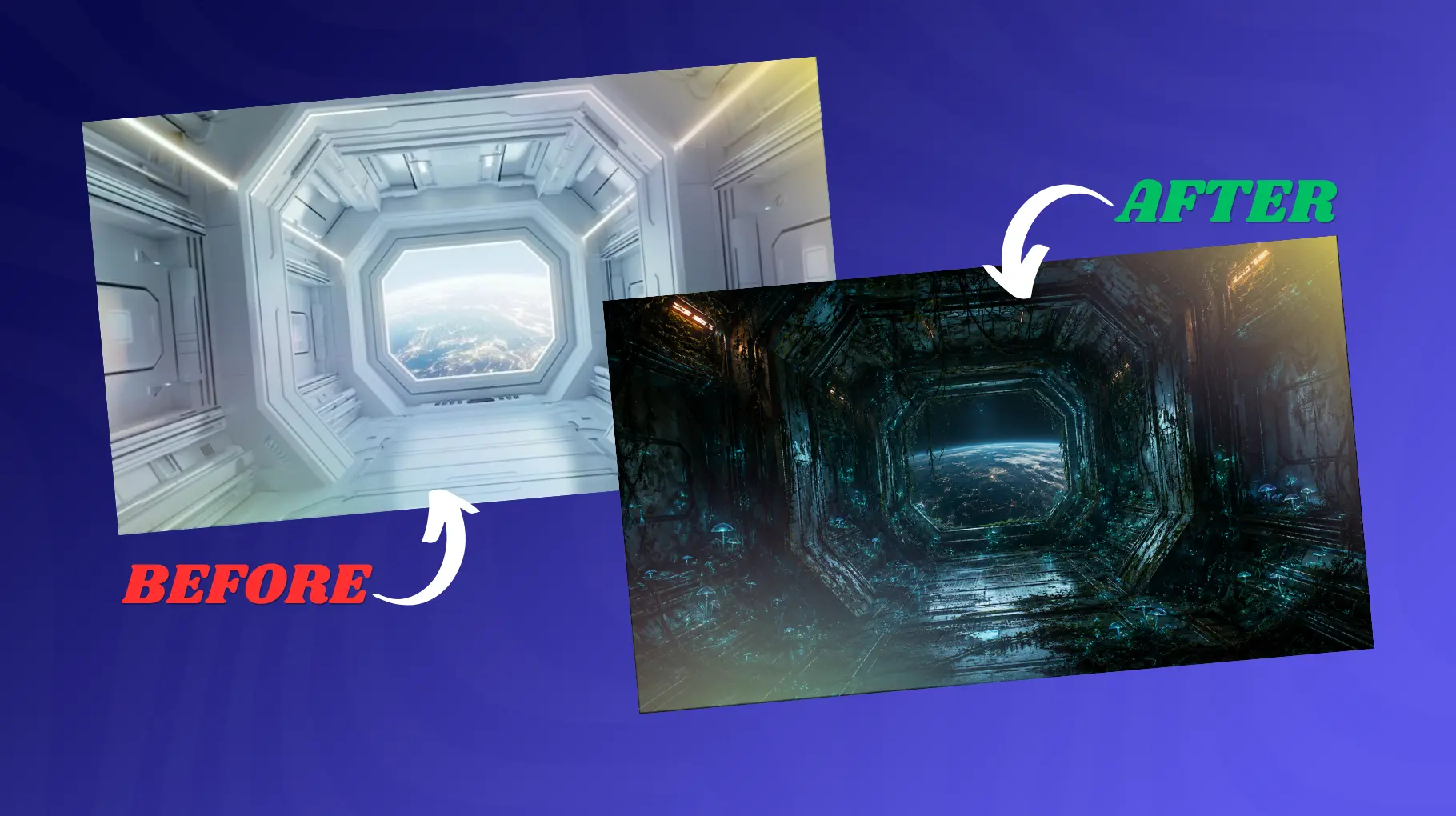
Interior of an abandoned deep-space research station, overgrown with luminescent blue-green alien flora. Dim emergency lighting casts long orange shadows across the metal grating and exposed wiring. Ultra-wide cinematic lens, architectural photography framing, and slight lens distortion. Cold, eerie, post-apocalyptic sci-fi atmosphere. Alien and Prometheus production design aesthetic. Dread, isolation, wonder mood. 8K, hyper-detailed rust and moss textures, volumetric dust particles in light beams.
Why it works: Referencing Alien and Prometheus gives the model a very specific visual library to draw from. Combining cold blue-green bioluminescence with warm orange emergency lighting creates natural complementary color contrast.
7. Rainy Neon Street
Rain plus neon kind of makes this really bold look, like one of the most visually striking combinations you see in cinematic AI images. This prompt kinda controls both at the same time, with pretty exact precision.
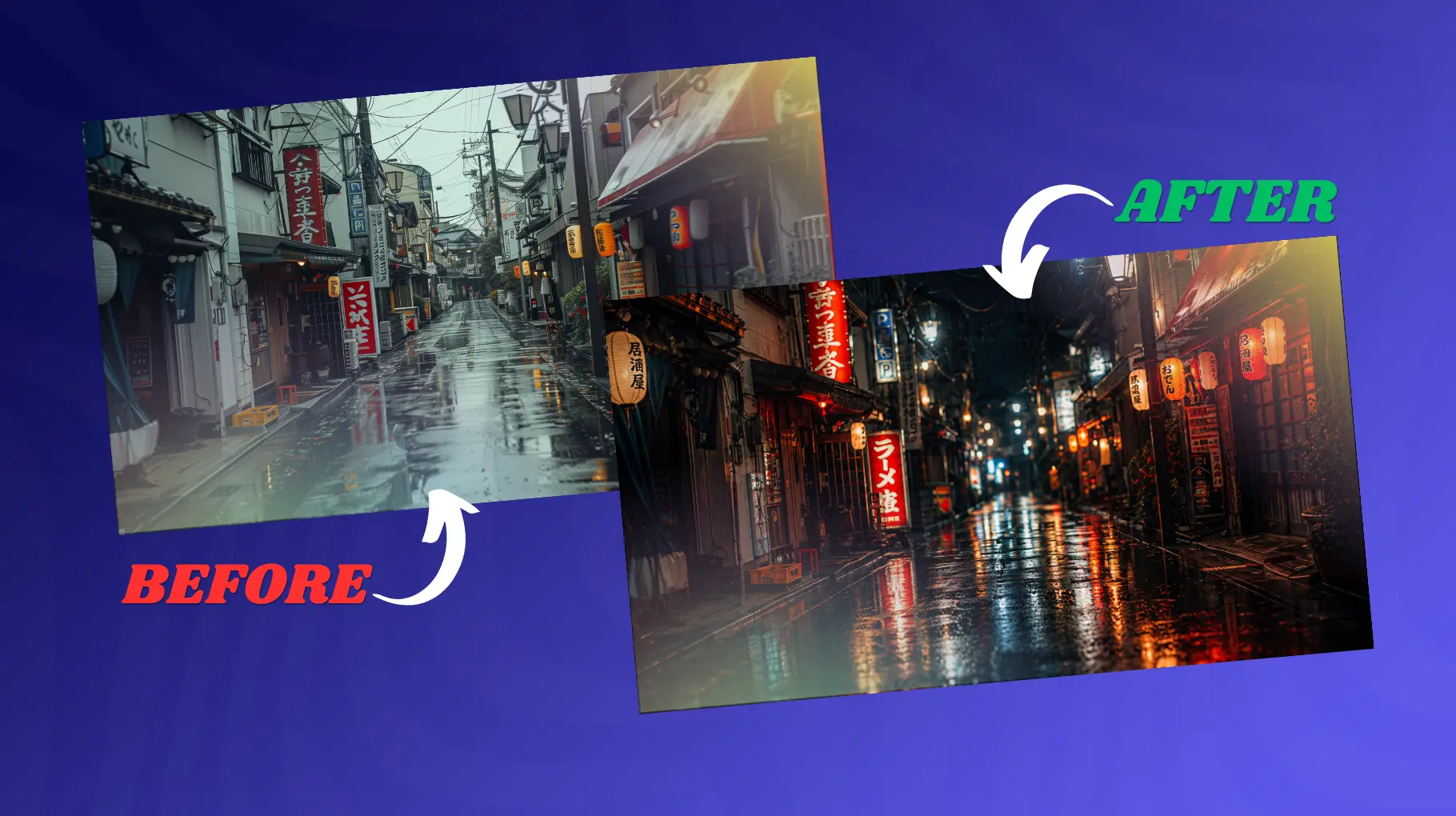
A narrow Japanese street at 2 am in heavy rain, paper lanterns and izakaya signs glowing in warm red and gold, reflections pooling in every surface. Low-angle shot looking down the alley, rain visible against backlit signage. Anamorphic lens, heavy bokeh on background lights. Warm versus cold color tension. Tokyo noir cinematic style. Melancholy, romantic, cinematic isolation. Ultra-detailed raindrops, wet surface reflections, 8K, analog film emulation, neon glow halos.
Why it works: That low angle looking down into the alley kind of makes leading lines, so it kinda yanks you into what's happening. And if you say something like "rain visible against backlit signage," then it tells the model to put a light source behind the rain so it shows up clearly.
8. Nature Cinematic Landscape
Landscapes in AI can start looking kinda fake, mostly because the scenes feel like they have no atmospheric depth at all. This prompt kind of stacks many depth hints together for a more photorealistic result, so it doesn't look so flat, if you get me.
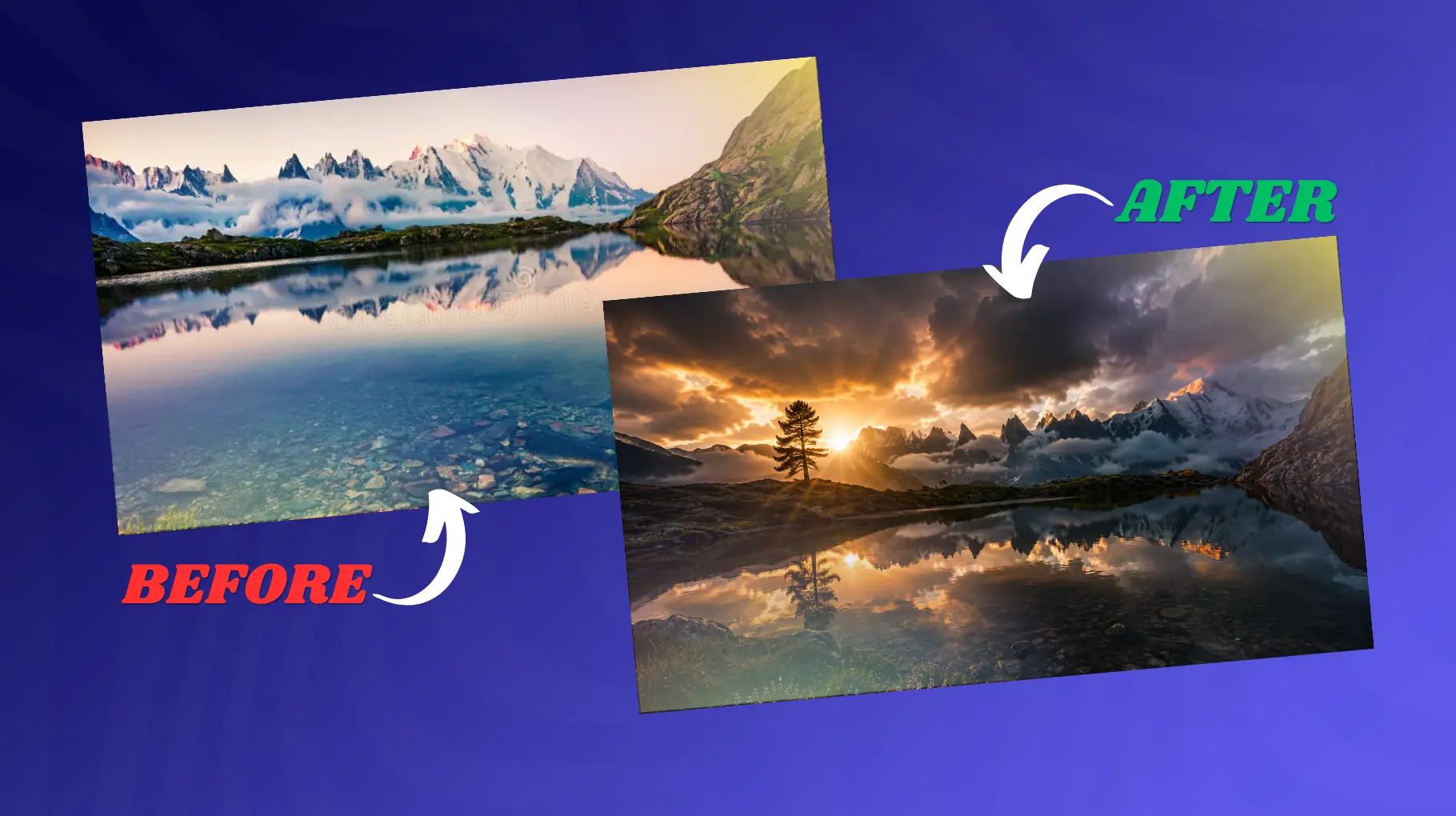
A lone pine tree silhouetted against a dramatic, stormy sky at sunset, rolling Scottish highlands in the foreground covered in purple heather, rays of golden light breaking through storm clouds. Wide-angle cinematic lens, 24mm equivalent, deep depth of field. Epic landscape photography style, Ansel Adams meets modern cinema. Dramatic, vast, emotionally powerful mood. Ultra-detailed cloud textures, volumetric god rays, 8K, cinematic teal and orange color grade, and photorealistic atmospheric haze.
Why it works: Layering foreground heather, then the midground with a silhouetted tree, and finally the background as a dramatic sky, gives those depth planes kind of at once. And when you reference Ansel Adams, it sort of gives the model a master photographer's compositional sensibility, like it already knows what to emphasize.
9. Anime Cinematic Artwork
Anime-style AI images work best when you kind of bridge that gap between illustration and, ya know, cinematic photography language; it's like you have to translate the vibe.
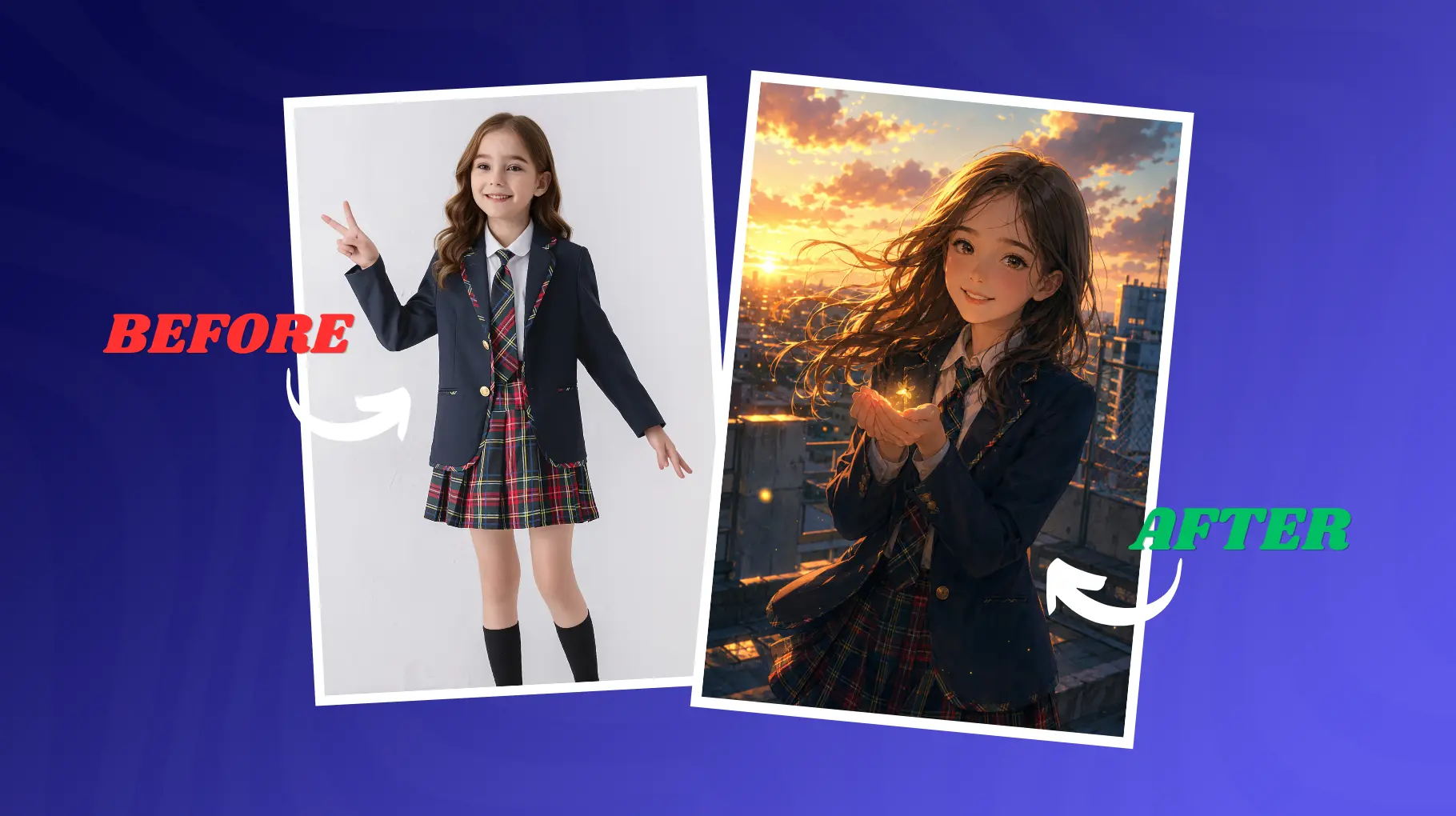
A teenage girl, kind of in a school uniform, standing on a rooftop during sunset, you can feel the wind pushing through her hair, and she's holding a glowing firefly in her cupped hands, like it's a tiny secret. There's soft golden hour backlighting behind her, so it makes this halo effect around her, with warm ambient fill light too, somehow making everything feel calmer, and just a little emotional. Semi-realistic anime art style, Studio Ghibli vibe-ish. Shallow depth of field, translated into an illustration look, as the background fades, but the moment stays crisp. The whole mood is nostalgic, gentle, with this slow emotional wonder. Ultra-detailed fabric and hair rendering, 8K, cinematic composition, with soft painterly textures.
Why it works: Studio Ghibli is pretty much one of those most recognizable aesthetic references that pop up in AI image generation. If you say something like "depth of field effect translated to illustration style," it kinda bridges that photographic language into the illustrated medium really naturally, you know, as it fits instead of fighting.
10. Product Photography Cinematic Setup
Product photography gets kinda ignored in a lot of AI prompt guides, but those cinematic product shots can look amazing for creators and marketers, too. Sometimes people skip it altogether, and then they wonder why the results feel a bit flat. If you're building visual assets at scale, combining this approach with the right AI image generation tools for marketing can really speed up your workflow.
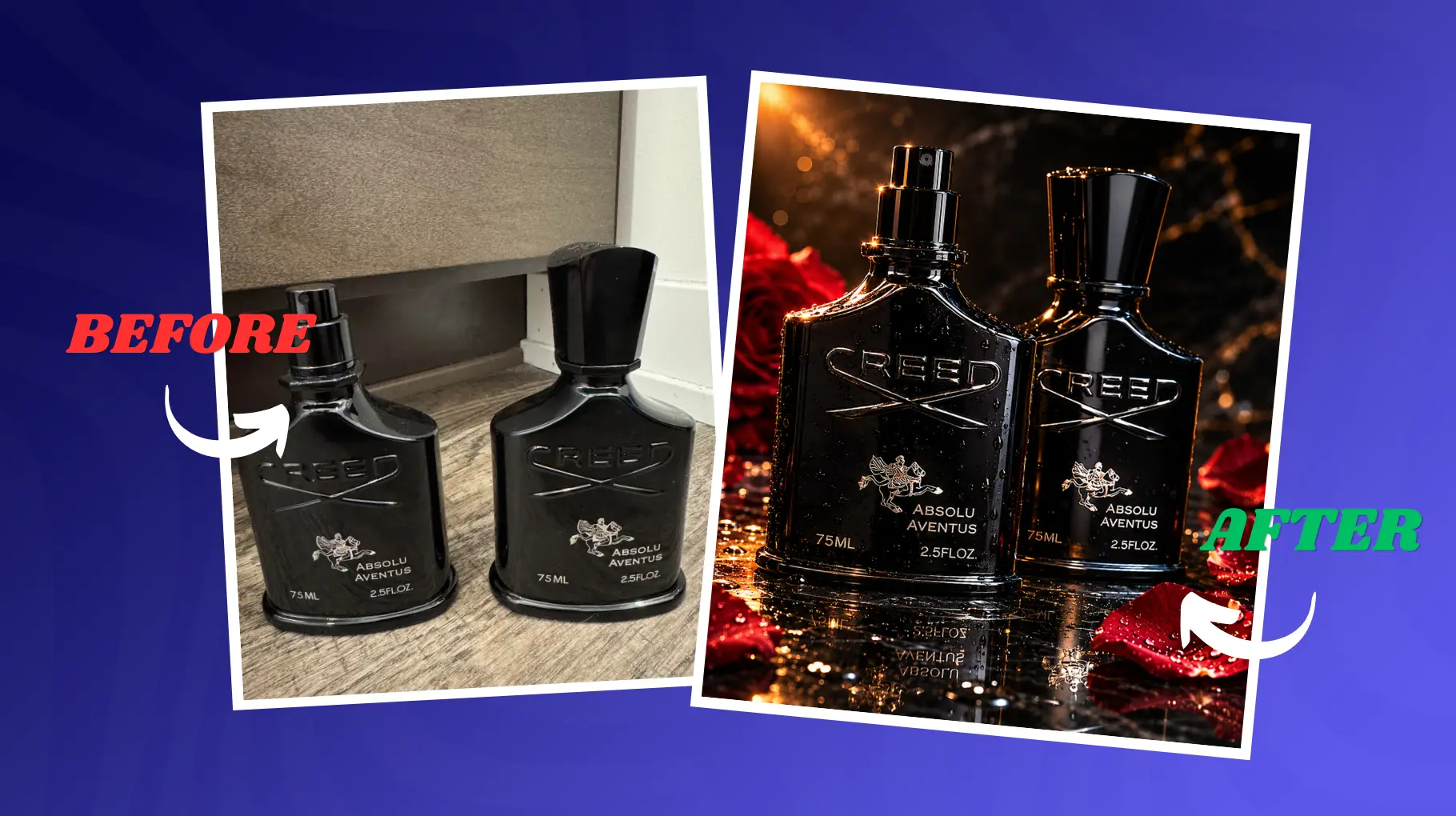
A luxury perfume bottle on a black marble surface, surrounded by scattered rose petals and soft water droplets. Single dramatic side light source creating reflections along the glass curves, deep black background, subtle rim light on the bottle edge. Macro photography feel, 100mm equivalent lens, extreme shallow depth of field on droplets. Dark luxury editorial style. Sensual, sophisticated, premium mood. Ultra-detailed glass refraction, 8K, cinematic black and gold color palette, hyperrealistic water droplets, and reflections.
Why it works: Product photography really kind of lives and dies by reflections, refraction, and all that stuff. If you tell the model to focus on glass curves and the way light reflections behave, it steers it toward that specific kind of detail that makes a product look photorealistic, not just kind of rendered. And honestly, those subtle highlights can do 90% of the work.
What Makes an AI Image Look Cinematic?
Cinematic images don't just show up by accident, not even in real photography. They happen because of deliberate choices across a few different visual dimensions, kind of quietly but on purpose. Here's what actually makes a cinematic AI image different from a generic one, and why it feels more alive than just "pretty."
Lighting is the biggest differentiator. Like, cinematic lighting really leans on contrast directionality and color temperature to get you that mood. Think golden hour warmth, or rim light that separates the subject from the background, not just "bright enough." And then the cold blue feeling of a night scene, you know?
Camera feel matters even with AI images. If you name a specific lens type, an 85mm portrait lens, or an anamorphic widescreen setup, it basically tells the model to mimic how real cameras behave, including lens distortion, bokeh, and even focal compression. It's that small realism, kind of.
Color grading ties everything together into one palette. Real films get color-graded in post-production, so the tone stays consistent. Terms like "teal and orange grade" or a "muted desaturated palette" help recreate that look, more unified than random color.
Depth of field creates a visual hierarchy. A crisp subject against a blurred background reads immediately as professional photography, not some flat render thing.
Composition also guides where the viewer looks. Cinematic framing can include the rule of thirds, negative space, and a deliberate foreground element that adds depth instead of everything sitting on the same plane.
Mood and atmosphere are the emotional layer. Rain, fog, dust particles, and lens flares, these aren't decoration only; they become environmental storytelling.
Realistic textures also ground the image. Skin pores, fabric weave, weathered concrete... all those micro-details push it from "digital looking" into something more photographic; you can feel it.
Compare that with a generic prompt like "a woman standing in a city." It often gives a competent but soulless render. But when you add cinematic details, that same subject turns into a story, kind of instantly.
Why Most AI Prompts Fail
If your AI images keep coming out flat or strange, one of these five mistakes is probably the cause:
Vague descriptions. "A beautiful landscape" gives the model almost nothing to work with. Beauty is subjective and immeasurable. Replace vague adjectives with specific sensory details.
Missing lighting instructions. Lighting is the most powerful visual tool available, and most beginners skip it entirely. Without a lighting cue, the model defaults to flat, even illumination that looks like a product render.
No camera details. Telling the model to think like a camera operator changes everything. Lens choice, aperture feel, and framing instructions signal that this image should look photographic rather than illustrated.
No mood or emotion. Cinematic images make you feel something. Adding emotional direction like "melancholy," "tense," or "euphoric" shapes how the model interprets color, expression, and atmosphere.
Overloaded prompts. Packing 30 conflicting ideas into one prompt creates visual chaos. Longer is not always better. A focused, well-structured prompt outperforms a dumped list of keywords every time.
The Anatomy of a Perfect Cinematic Prompt
Every great cinematic prompt sort of follows this loose structure, like you could nudge it around a bit. You don't really have to stick to it rigidly, but if you get the layers of it, it helps you create those prompts that actually work in practice. If you want to go even deeper on this, exploring dedicated AI prompt tools can give you a real edge when fine-tuning your creative workflow.
Subject: Who or what is in the image? Be specific. Not "a man" but "a weathered detective in his 50s, sharp eyes, slight stubble."
Environment: Where are they? Include spatial details and atmospheric context. "Standing in a narrow alley, wet cobblestones reflecting neon signs."
Lighting: What is the light source and quality? "Side-lit by a single warm streetlamp, deep shadows on the opposite side."
Camera: How should this be framed and captured? "Shot on 85mm f/1.4 lens, shallow depth of field, slight lens flare."
Style: What visual reference or genre applies? "Film noir, gritty realism, analog grain."
Mood: What should the viewer feel? "Tense, isolated, cinematic noir atmosphere."
Quality modifiers: These push the output toward photorealistic high quality. "8K resolution, ultra-detailed, award-winning photography, cinematic color grade."
Here is a complete example that puts all seven layers together:
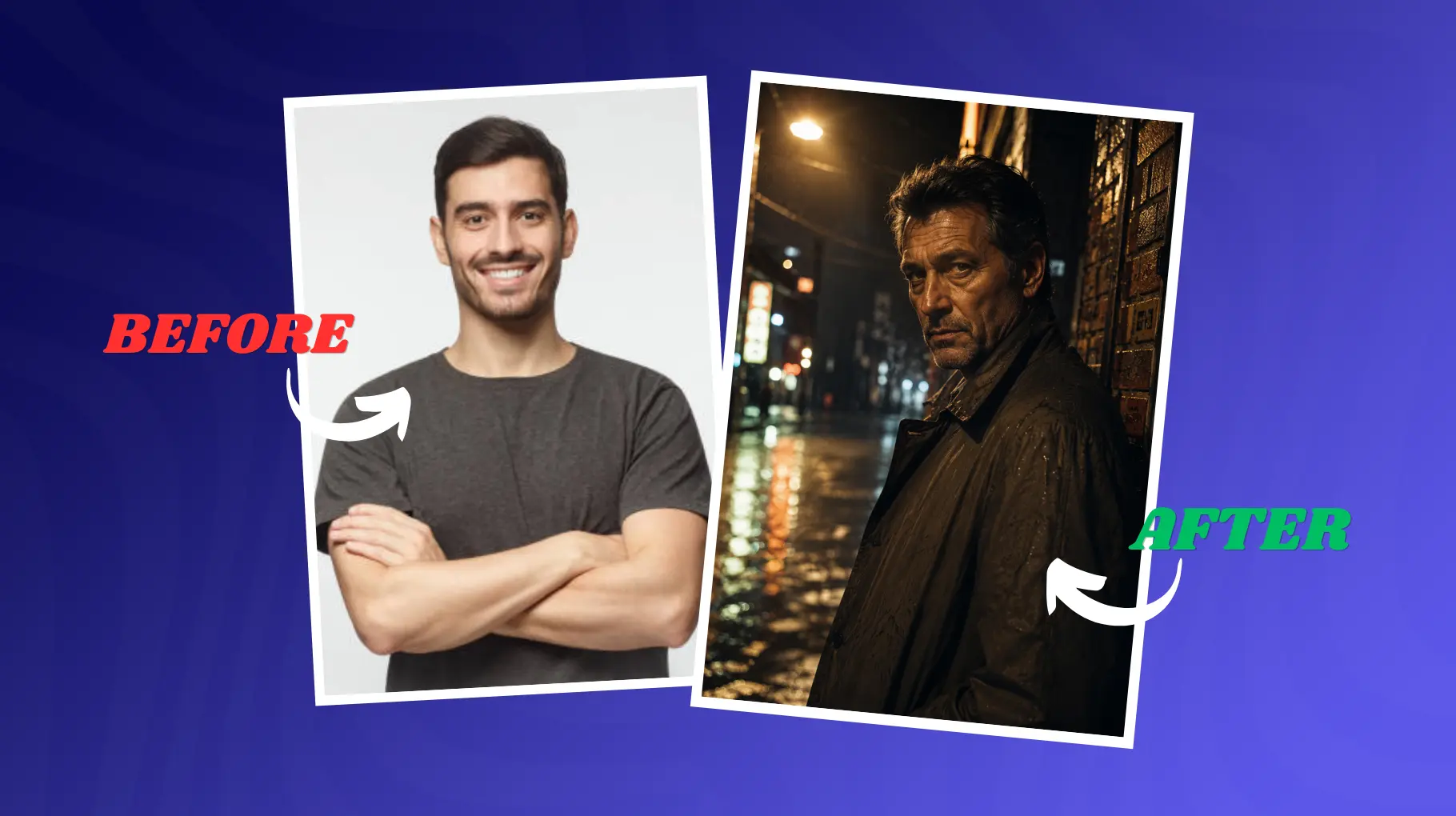
A weathered detective in his 50s, with sharp eyes, slight stubble, wearing a rain-soaked trench coat, standing in a narrow alley with wet cobblestones reflecting neon signs. Side-lit by a single warm amber streetlamp, with deep cinematic shadows on the opposite side. Shot on an 85mm f/1.4 lens, shallow depth of field, and slight lens flare. Film noir style, gritty urban realism, analog film grain. Tense, isolated, melancholy mood. 8K resolution, ultra-detailed, award-winning photography, cinematic color grade, hyper-realistic textures.
Notice how every layer adds something. Remove any one of them, and the image gets weaker.
Lighting Keywords That Instantly Improve AI Images
| Lighting Keyword | Effect | Best Use Case |
| Golden hour | Warm, soft orange-amber tones with long shadows | Portraits, landscapes, fashion |
| Rim lighting | A bright outline separating the subject from the background | Portraits, dramatic character shots |
| Volumetric lighting | Light beams made visible through fog or particles | Fantasy, sci-fi, nature |
| Neon glow | Colorful artificial light with halo falloff | Cyberpunk, urban night scenes |
| Chiaroscuro | Extreme contrast between light and deep shadow | Dark, moody portraits, noir |
| Softbox lighting | Even, diffused studio-style illumination | Product photography, beauty portraits |
| Cinematic shadows | Intentional dark areas that add mood and mystery | Drama, thriller, editorial |
| God rays | Shafts of light breaking through clouds or openings | Landscapes, fantasy, spiritual scenes |
Using just one of these terms, it kind of changes how a model handles illumination, like differently. Try swapping in "volumetric golden hour rays" for what you wrote as "bright lighting" in your next prompt, and compare the result; you should notice the contrast right away.
Camera Keywords That Make AI Images More Realistic
| Camera Keyword | Effect on Image Quality |
| 85mm lens | Portrait compression, natural perspective, minimal distortion |
| Anamorphic lens | Widescreen cinematic ratio, horizontal lens flares |
| Shallow depth of field | Sharp subject, blurred background, professional look |
| Bokeh | Soft circular light blur in out-of-focus areas |
| Macro photography | Extreme close-up detail, visible micro-textures |
| Wide angle | Expanded field of view, slight perspective distortion on edges |
| Tilt shift | A selective focus effect that makes real scenes look miniature |
| Cinematic framing | Rule-of-thirds composition, letterbox proportions |
Camera language is one of the quickest ways to boost image quality. AI models get trained on millions of actual photos, with camera data attached, so lens references make the photographic rendering habits kick in. "Shot on 85mm f/1.4" is not only a description, but it is kind of an instruction, like a quiet directive for how the shot should look.
Best AI Tools for Cinematic AI Images
| Tool | Best For | Strengths |
| Midjourney | Artistic cinematic images, stylized renders | Exceptional aesthetics, strong style coherence |
| Flux | Photorealistic results, detailed textures | Highly literal prompt following, sharp detail |
| DALL-E | Quick iterations, integrated workflows | Easy access via ChatGPT, good for concepts |
| Stable Diffusion | Custom workflows, fine-tuned models | Maximum control, free, huge community |
Midjourney still feels like the best bet when you're chasing cinematic, and also that artistic kind of look, because its aesthetic intelligence is kinda unmatched, like honestly. If you want an image that seems to have been yanked straight out of a movie frame, then Midjourney is the obvious starting point, more or less.
Flux, especially Flux Pro and Flux 1.1 Pro, really shines for photorealism and prompt obedience. That makes it a strong choice for product photography, but also for realistic portraits where small stuff has to line up. If you want a side-by-side breakdown of how these models actually perform, an AI models comparison can help you decide which one fits your style best.
Then there's DALL-E through ChatGPT, which is probably the best option if you're the type who needs quick concept images without breaking your writing flow, like staying in the same workflow and all.
And for Stable Diffusion, combined with cinematic LoRA models, advanced users get the kind of control that matters most, especially when you need consistent characters over multiple generations.
Advanced AI Prompt Engineering Tips
Once you have the basics down, these techniques push your results further:
Negative prompting tells the model what to avoid. In Stable Diffusion, you can use a dedicated negative prompt field. In Midjourney use --no followed by unwanted elements. Common negative prompts: --no blur, text, watermark, deformed hands, low quality.
Style stacking basically means you're combining several style references in a single shot; sometimes it feels like the image is stitched together from a few moods. Like, "Blade Runner meets Degas impressionism" gives you this visual fusion that's honestly more absorbing than either one alone, even if you can't quite explain why.
Prompt layering is more about building the prompt in distinct levels: subject, environment, light, camera, and mood. Not like a random stream of consciousness dump. When the prompt is structured, you usually get results that are way more predictable. For anyone who wants to go deeper on this craft, browsing prompt engineering tools is worth your time.
Cinematic references are crazy effective because the AI has ingested huge amounts of film-related material. Dropping names of directors, cinematographers, or specific titles (Blade Runner, Mad Max: Fury Road, Wong Kar-wai) acts like a pretty dense visual library the model can browse, rather than guessing from scratch.
Then there's the iteration workflow, which is the professional way to do it. You generate 4 to 8 variations, you figure out what's actually working, you tighten up the strongest bits, and you run another round. Most of the time, one great image doesn't just appear from one prompt try; you have to loop it a little.
Conclusion
Cinematic AI photo prompts aren't really a trick or a shortcut. They're more like a skill, and yeah, with any skill, it gets better as you practice.
Every little piece you add to a prompt, lighting direction, a lens type, or even that emotional mood you're chasing, it gives the model a more certain image of what you have in your head.
The distance between generic AI images and ones that feel genuinely stunning is usually hiding inside the prompt, not the tool. Start with the 10 prompts in this guide, try shifting the lighting plus camera keywords, then go back and iterate until it matches your creative vibe.
Bookmark this article as your cinematic prompt reference, explore more AI tools and prompt guides at findmyaitool.com, and go create something worth looking at.
FAQs
1. What are cinematic AI photo prompts?
Cinematic AI photo prompts are detailed instructions that direct AI image generators to produce film-quality visuals with intentional lighting, camera language, color grading, and atmospheric mood. They are significantly more detailed than basic prompts.
2. How do I make AI images look more realistic?
Add specific lighting terms, lens references, texture details, and quality modifiers like "8K ultra-detailed" and "photorealistic." The more specific your sensory description, the more realistic the output.
3. What is the best AI tool for cinematic images?
Midjourney is widely considered the best for cinematic artistic quality. Flux Pro is the top choice for strict photorealism. Both support detailed prompt engineering.
4. Do cinematic prompts work in DALL-E?
Yes, DALL-E responds well to cinematic language including lighting, camera, and mood descriptors, though its output style differs from Midjourney. Results improve significantly with detailed prompts.
5. What lighting keywords should I always use?
Golden hour, rim lighting, volumetric lighting, and chiaroscuro are among the most impactful. Any directional or described light source beats generic "good lighting" in every case.
6. How long should a cinematic AI prompt be?
Between 50 and 150 words is the sweet spot. Short enough to stay focused, long enough to cover subject, environment, lighting, camera, mood, and quality modifiers.
7. Can beginners use cinematic AI prompts?
Absolutely. The prompts in this guide are copy-paste ready. Start by using them exactly as written, then modify one element at a time to see how changes affect the output.
8. What are the best Midjourney cinematic prompts?
Prompts that include anamorphic lens, film-specific color grades, and cinematographer references tend to produce the strongest cinematic results in Midjourney. The prompts in this guide are optimized for Midjourney and other major generators.
9. What does "shallow depth of field" do in AI prompts?
It instructs the model to simulate a large-aperture lens effect where the subject is sharp and the background blurs into smooth bokeh. This instantly reads as professional photography.
10. How do I improve AI image quality without changing tools?
Improve your prompt. Add lighting details, camera language, texture references, and quality modifiers. Tool upgrades help, but prompt quality is the biggest variable in the result.

