
Table Of Contents
7 Best AI Couple Photo Prompts to Create Romantic Portraits in Seconds
Published on : Jun 02 2026

What Are AI Couple Photo Prompts?
An AI couple photo prompt is a written description used in AI image creators such as Midjourney, Stable Diffusion, Adobe Firefly, or DALL·E 3 in order to generate an image of a couple in a romantic setting. If you want to get the most out of these tools, it helps to understand how the best AI image generators work before you start writing prompts.
In a good photo prompt, you have complete control over everything from lighting to the couple's pose and emotions, background, style of the camera, and even the atmosphere.
Key Facts at a Glance
Feature | Details |
Best Tools | Midjourney v6, DALL·E 3, Stable Diffusion XL, Adobe Firefly |
Prompt Length | 30–100 words for best results |
Most Requested Style | Golden-hour romantic realism |
Top Parameters | Lighting, pose, emotion, camera lens, aspect ratio |
Avg. Generation Time | 5–30 seconds depending on platform |
Free Options Available | Yes (Bing Image Creator, Adobe Firefly free tier) |
Why Most AI Couple Photos Look Generic (And How to Fix It)
And here's an even more uncomfortable truth: when you input something generic, such as "romantic couple holding hands," you get images that might as well have been taken out of the stock photo archives of 2008.
AI image generators are exceptionally powerful; however, they need clear instructions. Generic requests generate generic results. You just have to specify the desired mood, lighting, lens, and emotional setting for the picture to become remarkable rather than mediocre.
The following 7 examples have been crafted with this thought in mind, and each contains all elements of a successful AI photo prompt: subject, environment, lighting, mood, photography style, and art direction.
The 7 Best AI Couple Photo Prompts
1. Golden Hour Embrace - Warm & Cinematic
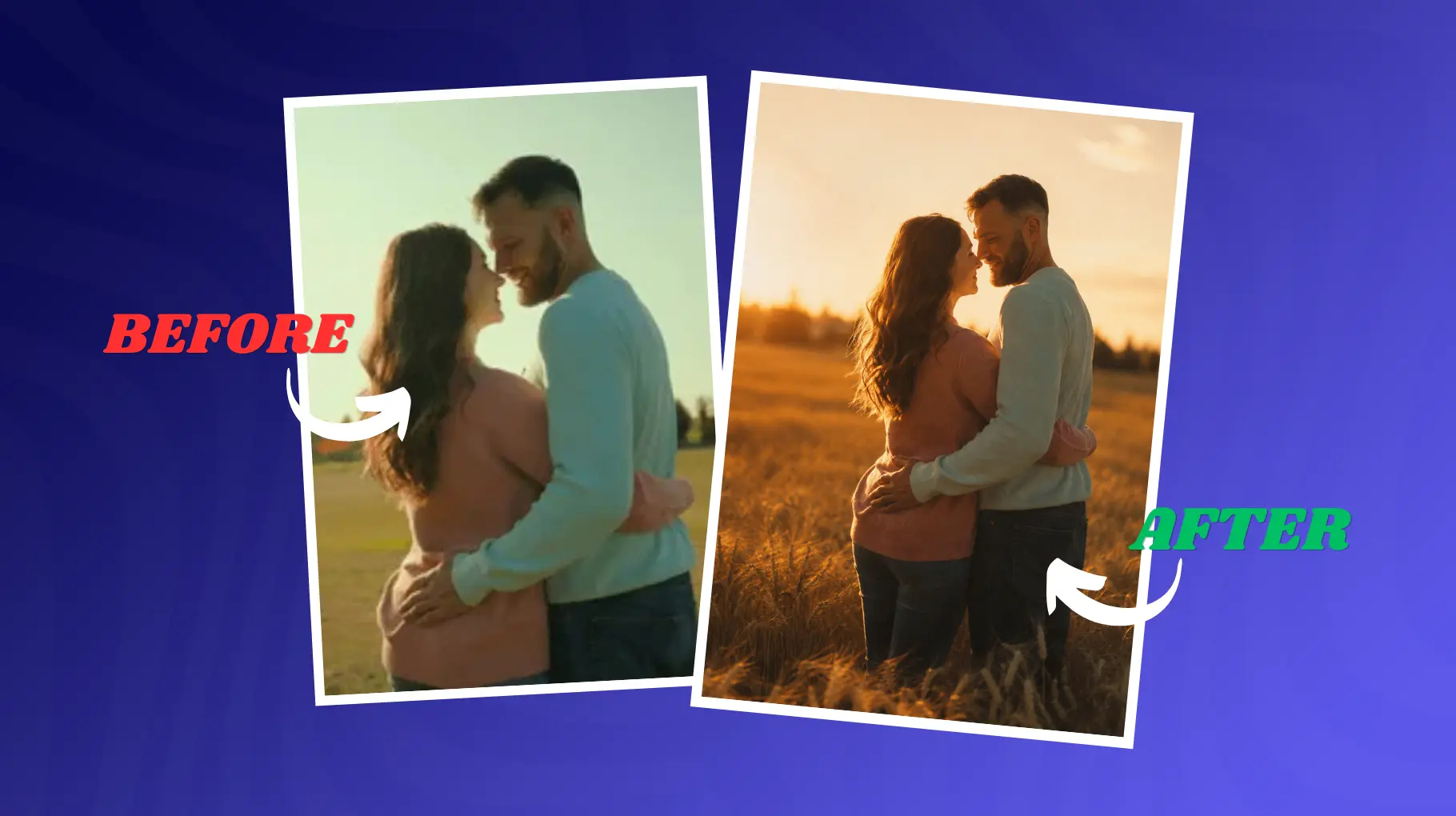
The Prompt:
A couple sharing a slow dance in an open wheat field at golden hour, warm amber sunlight casting long shadows behind them, soft bokeh background, shot on a Canon EF 85mm f/1.4 lens, photorealistic, cinematic color grading, shallow depth of field, film grain, aspect ratio 4:5
Why It Works:
This "golden hour" effect is achieved when light hits the subject during a period of 30–60 minutes after sunrise and 30–60 minutes before sunset. Giving the "85mm portrait lens" parameter means that the AI will make the background blurred, creating space between subjects. For even more inspiration on this style, check out these cinematic AI photo prompts that go deeper into dramatic lighting setups.
Best Platform: Midjourney v6, DALL·E 3 Mood: Timeless, nostalgic, warm
2. Rainy City Night - Moody & Romantic
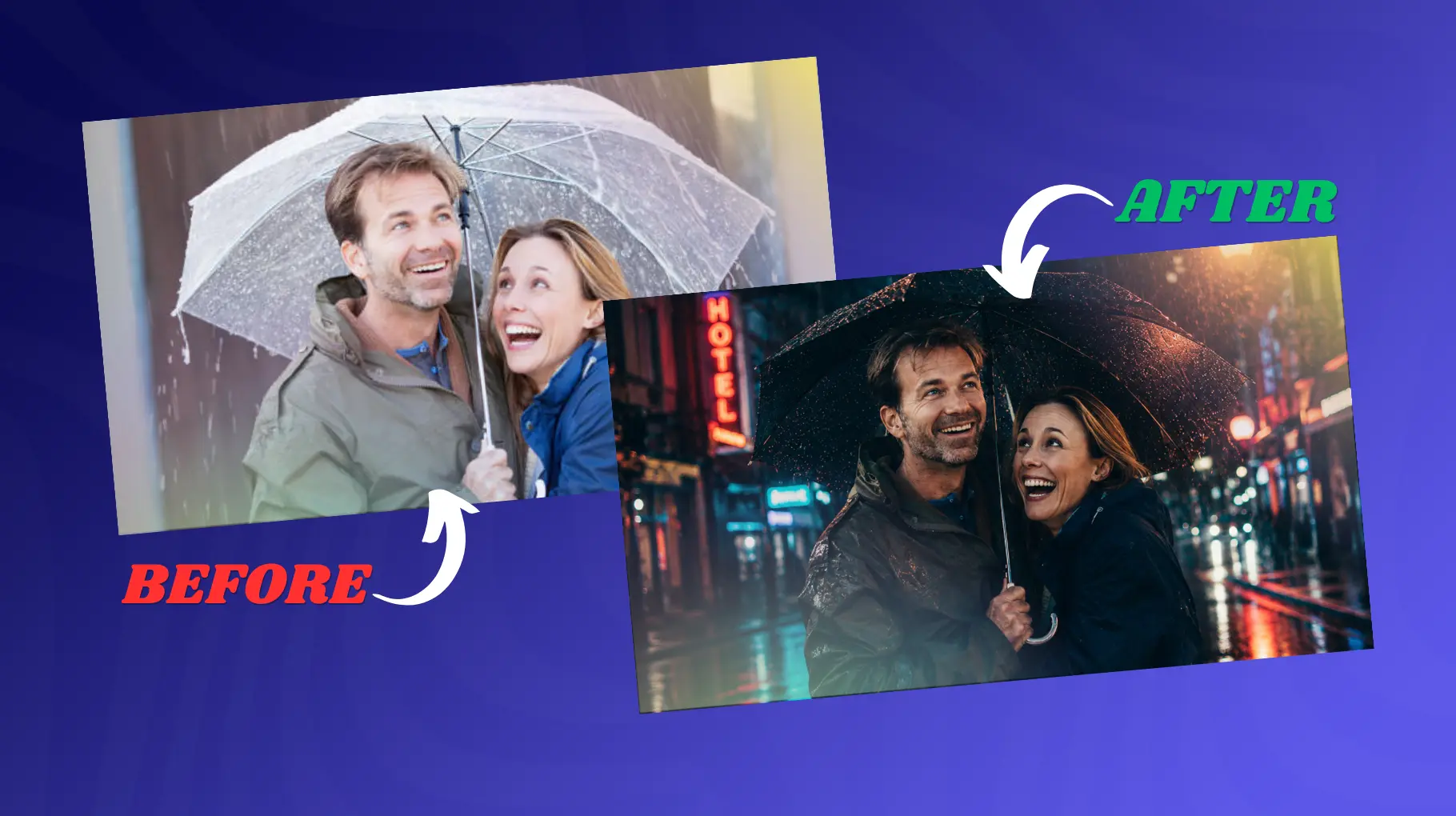
The Prompt:
A couple standing close under a shared black umbrella on a rain-slicked city street at night, neon reflections shimmering on wet cobblestones, soft rain falling, rim lighting from streetlamps, editorial fashion photography style, 50mm lens equivalent, deep shadows, cinematic teal and orange palette, ultra-realistic
Why It Works:
Rain turns an ordinary city scene into a stage set in its own right. Wet surfaces multiply your sources of light by reflecting them, and bright colors add visual interest without having to develop a complicated background behind them.
The use of teal/orange for your color grade is a tried-and-tested Hollywood cinematic technique.
Best Platform: Midjourney v6, Stable Diffusion XL Mood: Moody, passionate, cinematic
3. Cozy Indoor Morning - Intimate & Soft
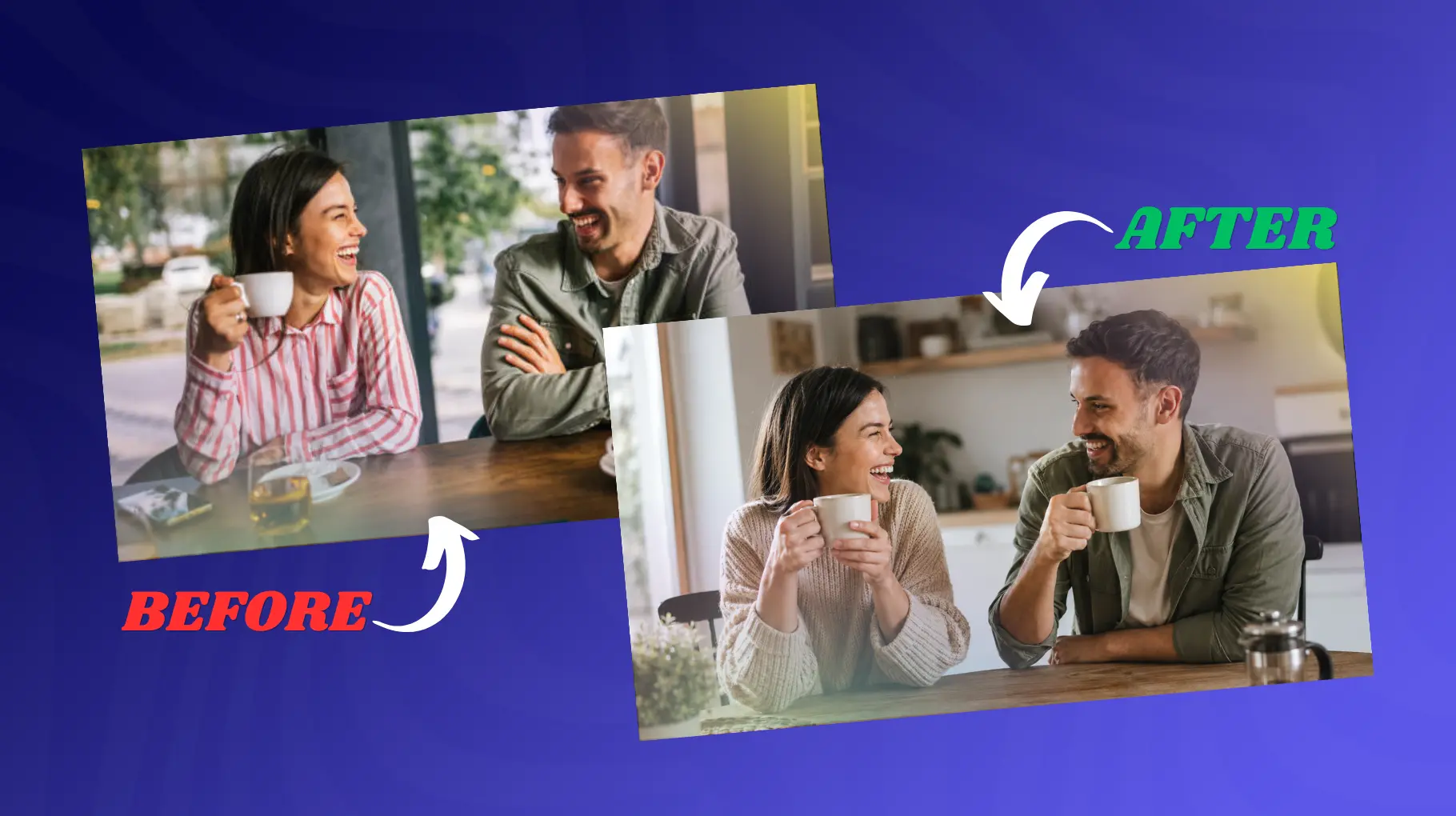
The Prompt:
A couple sitting together at a wooden kitchen table on a slow Sunday morning, soft diffused window light, coffee mugs in hand, relaxed and laughing, warm neutral tones, lifestyle photography aesthetic, Canon 5D Mark IV, 35mm lens, natural color palette, no harsh shadows, documentary-style intimacy
Why It Works:
Intimacy is conveyed through environment and body language, not grand gestures. The "documentary-style" direction tells the AI to depict a candid, unstaged moment rather than a posed tableau. Soft window light is the gold standard for indoor portraiture, it's flattering, directional, and entirely natural.
Best Platform: Adobe Firefly, DALL·E 3 Mood: Warm, everyday love, authentic
4. Forest Fairy Tale - Magical & Ethereal
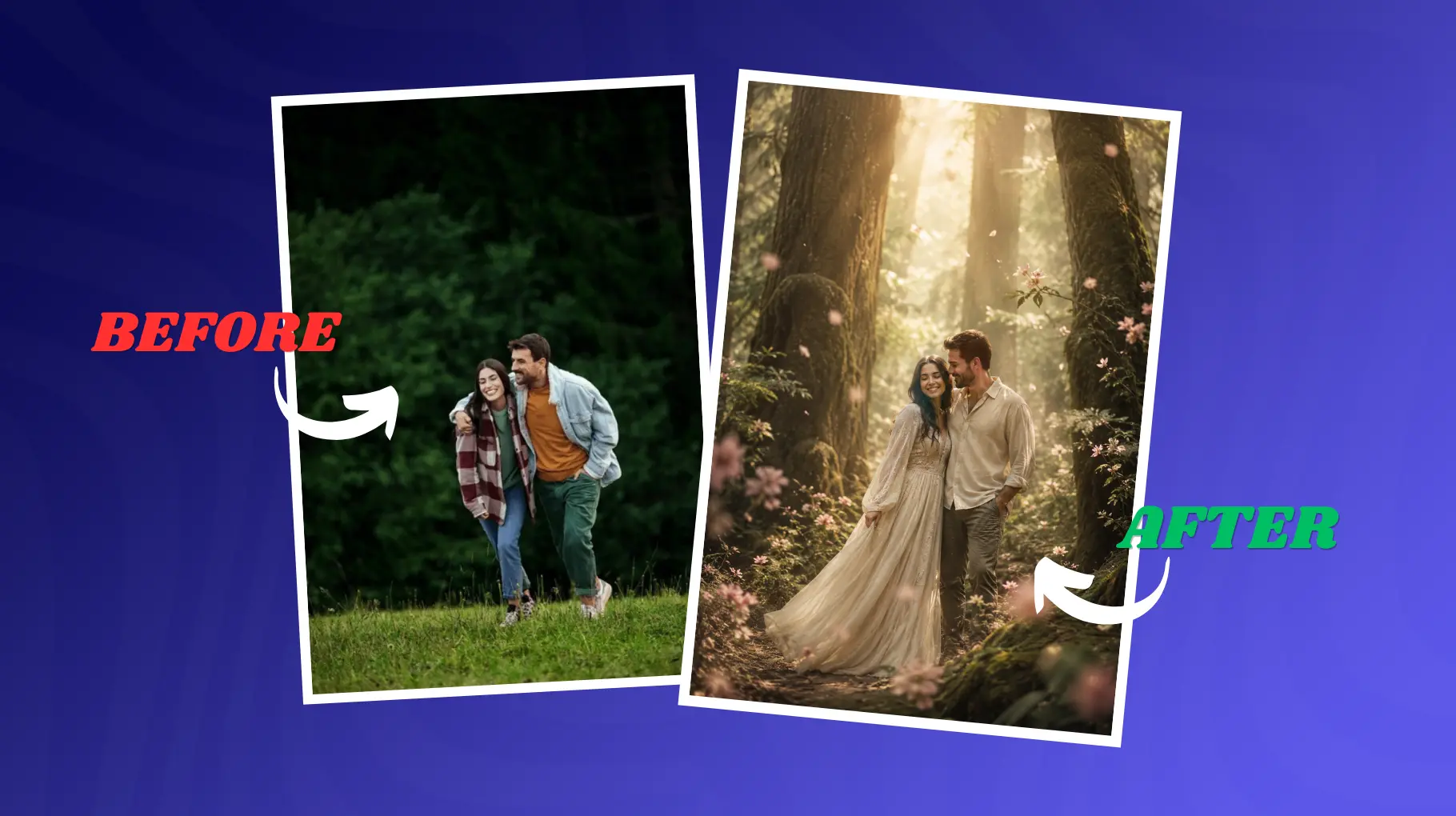
The Prompt:
A couple standing in a misty ancient forest, golden light filtering through towering trees, the woman in a flowing ivory dress, petals drifting in the air, ethereal and dreamlike atmosphere, shot with a wide aperture creating a painterly bokeh, inspired by fantasy editorial photography, soft pastel color palette, magical realism
Why It Works:
Fantasy-adjacent prompts thrive when you combine specific visual anchors (flowing dress, misty forest, falling petals) with an artistic reference ("magical realism"). Without that anchor, the AI may produce something generic. The "painterly bokeh" instruction pushes the output toward a soft, artistic quality that differentiates it from standard photo realism. If you enjoy this dreamy aesthetic, you might also like exploring AI anime generator styles that blend illustration with fantasy visuals.
Best Platform: Midjourney v6, Stable Diffusion with LoRA fine-tuning Mood: Dreamy, whimsical, fairy-tale romance
5. Beach Sunset Silhouette - Bold & Iconic
The Prompt:
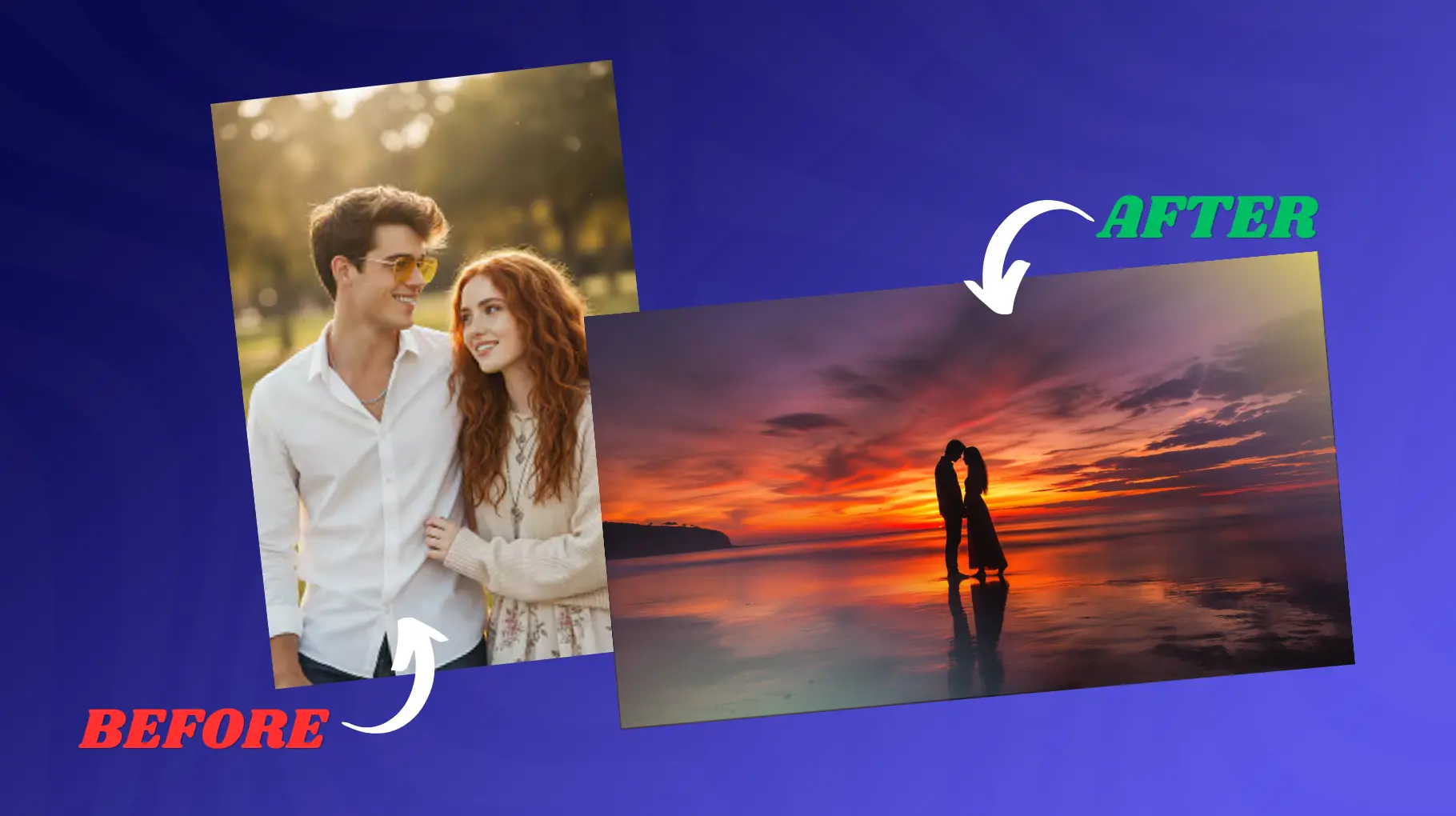
A silhouette of a couple standing on an empty beach during sunset time with their heads touching while having a look at each other, bright orange and dark violet sky reflected on the quiet water body, minimalistic scene composition, wide angle, dramatic sky, Sony A7III camera style, long exposure photography
Why It Works:
The silhouette composition is one of the most powerful and universal representations of romance since it strips away all distracting elements, leaving only the pure form and light. This particular prompt mentions "touching foreheads," an act whose romantic significance is immediately recognizable even in a silhouette image. "Long exposure technique" gives a dreamlike quality to the whole picture through its effect on the water.
Best Platform: Any major AI generator, this prompt style is highly compatible Mood: Bold, iconic, emotionally resonant
6. Vintage Film - Retro & Nostalgic
The Prompt:
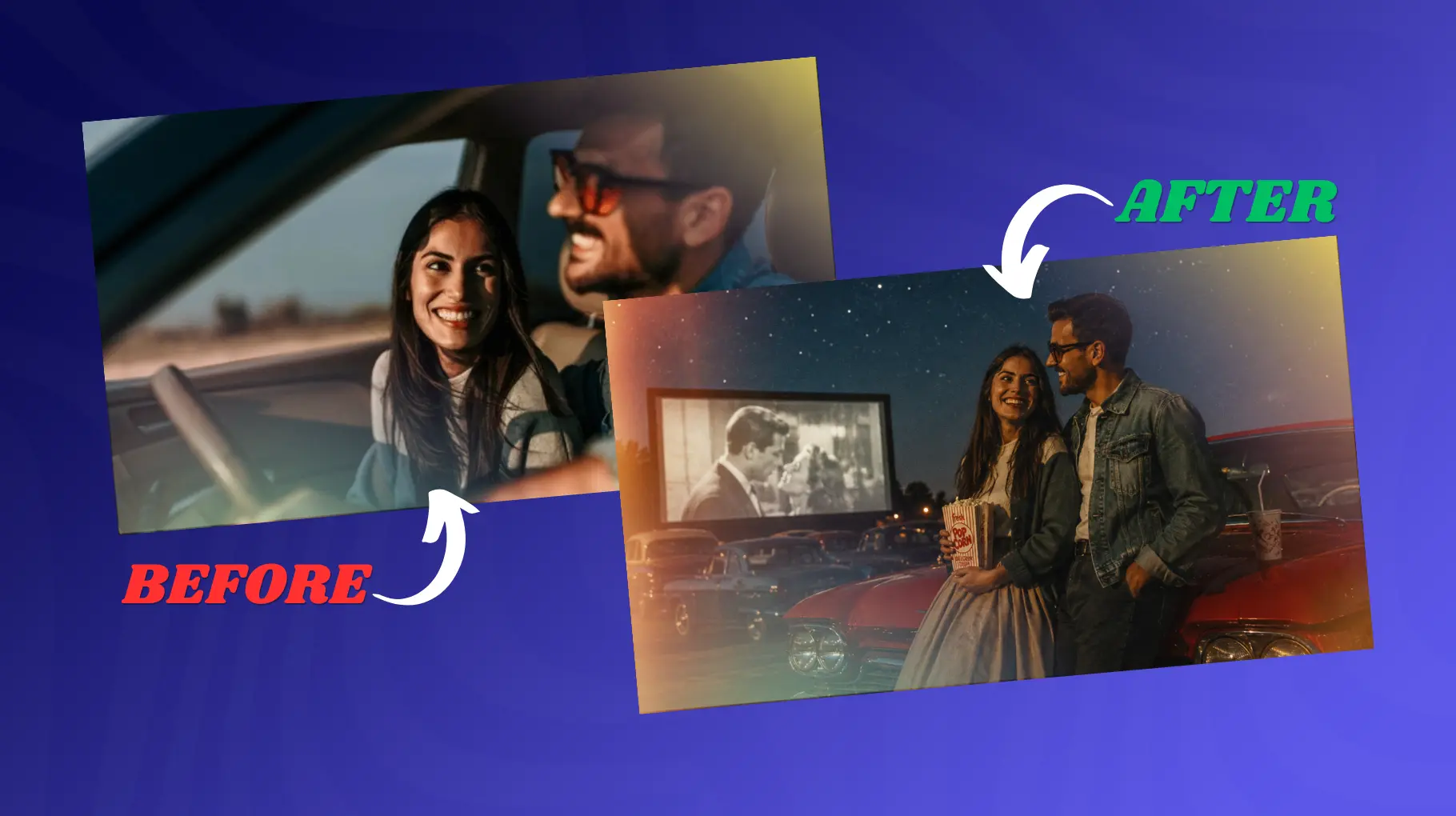
A couple in a vintage outdoor drive-in movie theater from the 1960s era posing by a red classic car, against a backdrop of a dark and star-filled sky, taken using Kodak Portra 400 film, with light-leaking effects, retro grain, halation lighting effect, Americana nostalgia look
Why It Works:
The nostalgic aesthetic works on a deep level due to its association with collective cultural memories. Through your suggestion to use Kodak Portra 400, which is among the most popular film stocks used in portrait photography, the AI knows exactly what kind of colors to render. The inclusion of "light leaks" and "halation" as characteristics adds to the overall authentic vintage effect of the photo.
Best Platform: Midjourney v6, Stable Diffusion XL Mood: Retro, warm, storytelling-driven
7. Luxury Editorial - High Fashion & Bold
The Prompt:
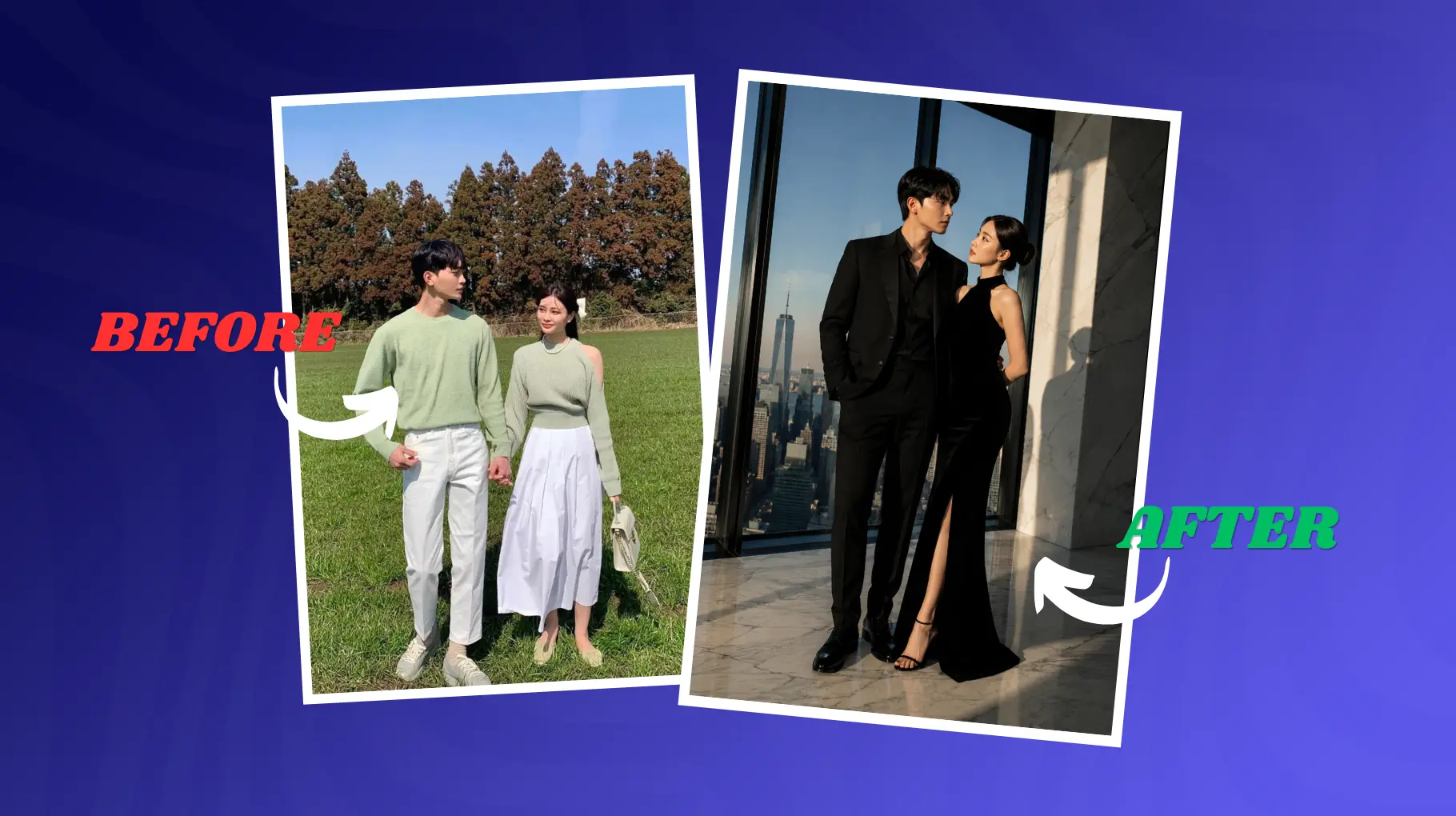
Portrait of a couple in stylish black evening wear against the backdrop of the city skyline from the dramatic marble-floored penthouse with floor-to-ceiling windows, high-key studio lighting producing hard shadows, fashion shoot, photographed with a Hasselblad medium format camera, saturated colors of cinematic appeal, minimalistic architecture, and extreme details.
Why It Works:
Prompts for luxury editing need confidence in terms of the visual language that is used. With this prompt mentioning Vogue as a tonal reference, you are saying a lot about lighting, framing, and mood to the model. The use of "harsh directional lighting" will be opposite to soft-light prompting and will create an entirely different tone, which is confident, ambitious, and architectural. With a "medium format Hasselblad camera," you are telling the AI to imitate the unique quality of professional photographs.
Best Platform: Midjourney v6 Mood: Aspirational, bold, fashion-forward
How to Customize These Prompts for Your Needs
To Change Ethnicity or Features
Each couple is unique, and you can tailor the instruction by giving specific characteristics of their appearance at the start. For example, you can mention an ethnic group, age group, hair texture, facial traits, or other factors that would help generate a realistic portrait. Some examples might be "a South Asian couple," "a mixed-race couple in their forties," or "a couple with natural curly hair."
To Change Season
The mood of a picture can change entirely depending on the season we refer to. It is only necessary to replace natural components of the description to achieve this effect. For instance, instead of a "golden wheat field," you may choose a "pine tree forest covered with snow." Alternatively, you may opt for the description of "cherry blossoms in springtime."
To Adjust Skin Tone Rendering
AI picture creators may have problems with the proper exposure of various skin colors. In order to achieve better results, use phrases such as "proper skin tone," "skin color with melanin," or "natural skin tones." The use of these prompts will ensure that the model keeps the right lighting. You can also use a best AI photo editor online to fine-tune skin tones after generation for more accurate results.
To Control Output Ratio
Various platforms and purposes demand various sizes for the images produced. The vast majority of AI engines enable you to set an aspect ratio depending on your needs. For instance, if you want to create Instagram pictures, --ar 4:5 should be used; if you want to generate widescreen wallpaper or banner images, --ar 16:9 should be employed, while --ar 1:1 is perfect for square social media posts.
Comparison: Best AI Image Generators for Couple Photos
Feature | Midjourney v6 | DALL·E 3 | Stable Diffusion XL | Adobe Firefly |
Photorealism | Good | Better | Average | Good |
Prompt Adherence | Yes | Yes | Yes, but little | Yes |
Free Tier | NO | Yes (via ChatGPT) | Yes (local/free services) | Yes (limited) |
Ease of Use | Medium | Easy | Advanced | Easy |
Skin Tone Accuracy | Good | Good | Variable | Good |
Couple Coherence | Excellent | Good | Good | Moderate |
Best For | Editorial & art | Everyday use | Custom fine-tuning | Commercial safe |
If you want to go further with how these platforms compare across different use cases, this AI models comparison guide breaks down the strengths and differences in more detail.
Common Mistakes to Avoid
1. Over-Specifying Faces Without Reference Images
The most frequent error is the overly detailed description of the face without giving any image references. AI systems can fail to integrate all the given parameters properly, making it difficult for them to create a coherent face. Instead, concentrate more on the general impression, like emotions, expressions, chemistry, and the general appearance.
2. Conflicting Lighting Directions
The use of light is key to achieving a high-quality output from the artificial intelligence-generated portrait. Using conflicting instructions such as a "bright sunny day" with "dramatic studio shadows" will result in confusing the algorithm and generating inconsistent outputs. Select only one type of lighting, either golden hour light, window light, or dramatic studio lighting, for instance, and construct your prompt accordingly.
3. Skipping the Camera/Lens Specification
Most users fail to consider the role of the lens in their image generation request, even though this is an important aspect that affects both the composition and the realistic look of an image. The "85mm portrait lens," for example, provides good proportionality of facial features and blurry background, whereas the "24mm wide-angle lens" is capable of capturing more of the surrounding landscape but distorts facial features. Learning more about prompt engineering tools can help you write more precise and effective prompts every time.
4. Forgetting Aspect Ratio
The aspect ratio plays an important role in determining how the end product appears. The AI model will assume a ratio that will fit its defaults if no specific aspect ratio is chosen by the user, and it might not be what you want for the platform you plan on using. Portrait images of couples look good on ratios such as 4:5 and 2:3 while 16:9 will do well for wallpapers and banners.
Conclusion
Some couple photos do not happen by accident. They happen because someone takes the time to describe exactly what they want in terms of light quality, emotional register, camera perspective, and color palette.
Our seven prompts in this guide give you a proven starting point for each major romantic aesthetic, from golden-hour warmth to high-fashion drama. Just copy them, and experiment by combining elements from different prompts. The best image you will ever generate is usually the one you refine over three or four iterations.
AI image generation is an amazing skill that helps bring creative visions to life. The more accurately you communicate your vision, the better it gets rendered. These prompts are the vocabulary, and fluency comes with practice.
FAQs
1. What is an AI couple photo prompt?
An AI couple photo prompt is a written description you type into an AI image tool like Midjourney or DALL·E 3. It tells the AI what kind of couple photo to create, including the pose, lighting, background, mood, and camera style. Better words give better photos.
2. Which AI tool is best for generating couple photos?
Midjourney v6 is the top pick for editorial and cinematic couple shots. DALL·E 3 is great for everyday use and is beginner-friendly. Adobe Firefly works well for commercial-safe images. Each tool has its strengths, so pick one based on your skill level and purpose.
3. How do I make AI couple photos look more realistic?
Add specific details like the camera lens type, lighting style, and mood to your prompt. For example, mention "85mm portrait lens" or "golden hour lighting" to get sharper, more natural results. Avoid vague prompts like "romantic couple" since those produce generic, stock-photo-style images.
4. Can I customize AI couple photo prompts for different skin tones?
Yes, you can. Add phrases like "natural skin tones," "melanin-rich skin," or "proper exposure for dark skin" to your prompt. This helps the AI render accurate and flattering skin colors. Always include these details upfront so the model applies them throughout the full image.
5. What aspect ratio should I use for AI couple photos?
Use 4:5 for Instagram portrait posts, 1:1 for square social media images, and 16:9 for widescreen wallpapers or banners. Setting the right aspect ratio before generating saves time and avoids awkward cropping. Most AI tools like Midjourney let you set this with a simple parameter.
6. Why do AI couple photos look fake or generic?
It usually happens when the prompt is too short or too vague. Typing just "couple in love" does not give the AI enough to work with. Adding lighting type, lens, color tone, and emotional cues helps the AI understand your vision and produce something that actually feels real and unique.
7. What are the most romantic AI photo prompt styles?
Golden hour embrace, rainy city night, cozy indoor morning, and beach sunset silhouette are among the most loved romantic styles. Each one creates a different mood. Golden hour feels warm and nostalgic, rainy nights feel cinematic and moody, and silhouette shots are bold and emotionally powerful.
8. Can I use AI couple photo prompts for free?
Yes. Bing Image Creator and Adobe Firefly both offer free tiers where you can generate couple photos without paying. Stable Diffusion is also free if you run it locally. DALL·E 3 is available through ChatGPT's free plan with some usage limits depending on your account type.
9. How do I avoid conflicting lighting in AI couple photo prompts?
Pick only one lighting style per prompt. Do not mix "bright sunny day" with "dramatic shadows" since the AI gets confused and produces unnatural results. Stick to one source like golden hour light, soft window light, or studio lighting. Clear, consistent lighting instructions always give you cleaner output.
10. How many words should an AI couple photo prompt be?
A good AI couple photo prompt is usually between 30 and 100 words. Too short means the AI fills in the gaps with its own defaults. Too long can cause the AI to ignore certain details. Focus on subject, setting, lighting, mood, lens, and color grade for the best results.

