Flova AI is an all-in-one AI video creation platform for storyboarding, scriptwriting, image and video generation, audio creation, and video editing.
What is Flova AI?
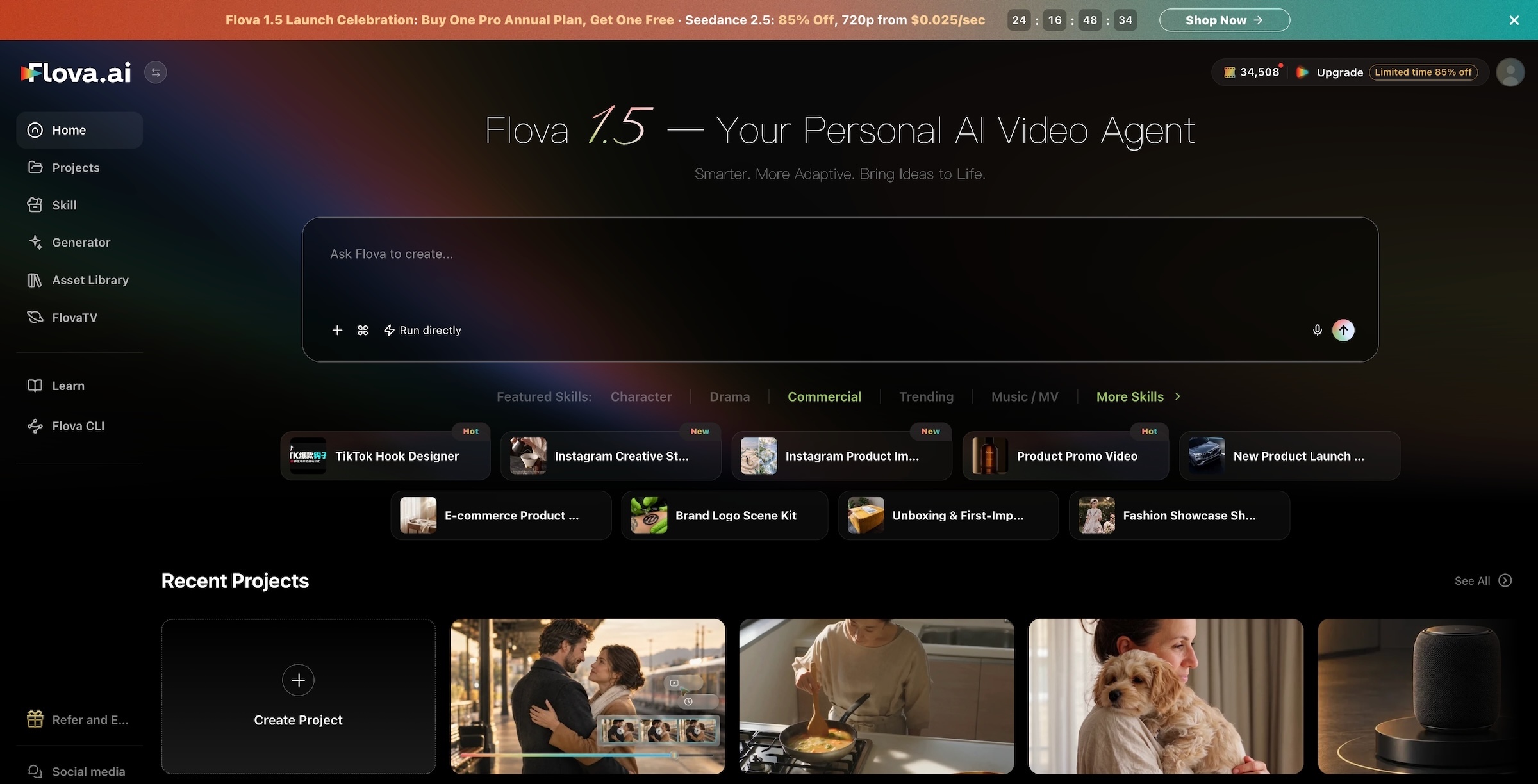
Flova AI is an all-in-one AI video creation platform that helps users transform creative ideas into complete video projects. It brings together AI-powered storyboarding, scriptwriting, image generation, video generation, audio creation, and video editing in a single workspace. Instead of managing multiple tools for different production tasks, creators can use Flova AI to plan, generate, organize, and refine their videos through one integrated workflow.
AI-Powered Video Production
Flova AI uses an AI agent to assist users throughout the video production process. Users can begin with a text prompt, creative brief, or reference files. Based on the provided input, the platform helps develop a script and create a shot-by-shot storyboard. This gives creators a structured overview of their video before generating individual scenes.
Users can review and edit the storyboard and prompts before starting generation. This makes it easier to adjust scene descriptions, refine creative directions, and improve the overall video concept. Once the storyboard is ready, Flova AI can generate the required images, video clips, music, and narration for individual scenes.
AI Storyboard and Scene Generation
One of Flova AI's useful capabilities is its AI storyboard workflow. It breaks a video concept into individual shots, helping users understand how each scene will contribute to the final production. Creators can customize prompts and regenerate specific shots without having to recreate the entire project.
The platform also supports saved characters, scenes, and visual style references. These assets help maintain a consistent appearance across different shots, which is particularly useful when creating storytelling videos, short films, animations, and branded content.
AI Image, Video, and Audio Generation
Flova AI combines different creative generation capabilities to support video production. Users can generate images and video clips for their scenes, as well as create audio elements such as music and narration. The platform brings these assets together so creators can build a more complete video without constantly switching between separate applications.
Editable Timeline and Reusable Workflows
After generating scenes, users can organize and refine their projects through an editable timeline. They can arrange clips, make changes to individual scenes, and work toward a finished video. Flova AI also offers reusable Skills, allowing users to save preferred workflows and apply them to future projects. Its asset management workspace keeps project materials organized and provides list, grid, and canvas viewing options.
Use Cases of Flova AI
Flova AI can support a variety of creative and professional video projects, including short films, short dramas, music videos, product advertisements, marketing campaigns, anime-style clips, and social media videos. Content creators can use it to develop engaging videos, while businesses and marketing teams can explore AI-assisted production for promotional and branded content.
Overall, Flova AI is designed for individual creators, freelancers, filmmakers, and creative teams who want a more organized approach to AI video production. By combining planning, visual generation, audio creation, and editing in one workspace, it helps simplify the journey from an initial idea to a finished video.
Key Platforms
Core Service Areas:

AI Video Agent
AI Storyboard Generator
AI Video Generation
AI Image Generation
AI Music & Voice Generation
Editable Video Timeline
Pros
- All-in-one AI video creation workspace.
- AI-powered scriptwriting and storyboarding.
- Generates images, videos, music, and narration.
- Supports individual scene regeneration.
- Helps maintain consistent characters and visual styles.
- Offers reusable Skills for repeated workflows.
- Includes an editable video timeline.
- Supports multiple creative video projects.
- Keeps project assets organized in one workspace.
- Suitable for creators, freelancers, and marketing teams.
Cons
- AI generation may consume credits quickly.
- Advanced features may require paid plans.
- Video generation can take time.
- Generated results may need manual editing.
- Output quality can vary depending on prompts.
- New users may face a learning curve.
- Requires a stable internet connection.
- AI-generated scenes may not always match the exact creative vision.
Frequently Asked Questions About Flova AI
01
1. What is Flova AI?
Flova AI is an all-in-one AI video creation platform that helps users create videos using AI-powered storyboarding, scriptwriting, image generation, video generation, audio creation, and editing tools.
02
2. How does Flova AI work?
Flova AI allows users to start with a text prompt or reference files. Its AI agent helps develop scripts, create storyboards, generate visual and audio assets, and organize scenes into a complete video project.
03
3. Can Flova AI generate videos from text prompts?
Yes. Users can provide text prompts or creative briefs to plan and generate video scenes through its AI-powered production workflow.
04
4. Does Flova AI support image-to-video generation?
Yes. Flova AI supports image-based video creation, allowing users to use reference images as part of their video generation process.
05
5. Can I create storyboards with Flova AI?
Yes. Flova AI can generate shot-by-shot storyboards from creative ideas, helping users plan scenes and review prompts before generating videos.
06
6. Does Flova AI offer AI image generation?
Yes. Users can generate visual assets for their video projects, including images that can be used as scene references and creative elements.
07
7. Can Flova AI generate music and voice narration?
Yes. Flova AI provides AI-powered audio generation capabilities, including music and narration, to support video production.
08
8. Can I edit videos using Flova AI?
Yes. Flova AI includes an editable timeline where users can arrange generated scenes, refine clips, and make changes to their video projects.
09
9. Who should use Flova AI?
Flova AI is suitable for content creators, filmmakers, freelancers, marketers, businesses, and creative teams interested in AI-powered video production.
10
10. What types of videos can I create with Flova AI?
Users can create short films, short dramas, music videos, product advertisements, anime-style videos, promotional content, and social media videos.
Promote Flova AI
Get Flova AI in front of thousands of buyers actively searching for AI tools. Feature your listing on the homepage and category pages, or add the verified badge to your site.
Copy Embed Code

Share on

Related AI Tools
Explore related AI tools for diverse applications and enhanced productivity
Unlock the best AI Tools for you!
Login or Approve this tool to continue exploring features and analytics.