


Seedance 2 Combines Text, Image, Video, and Audio into One Directed Output.
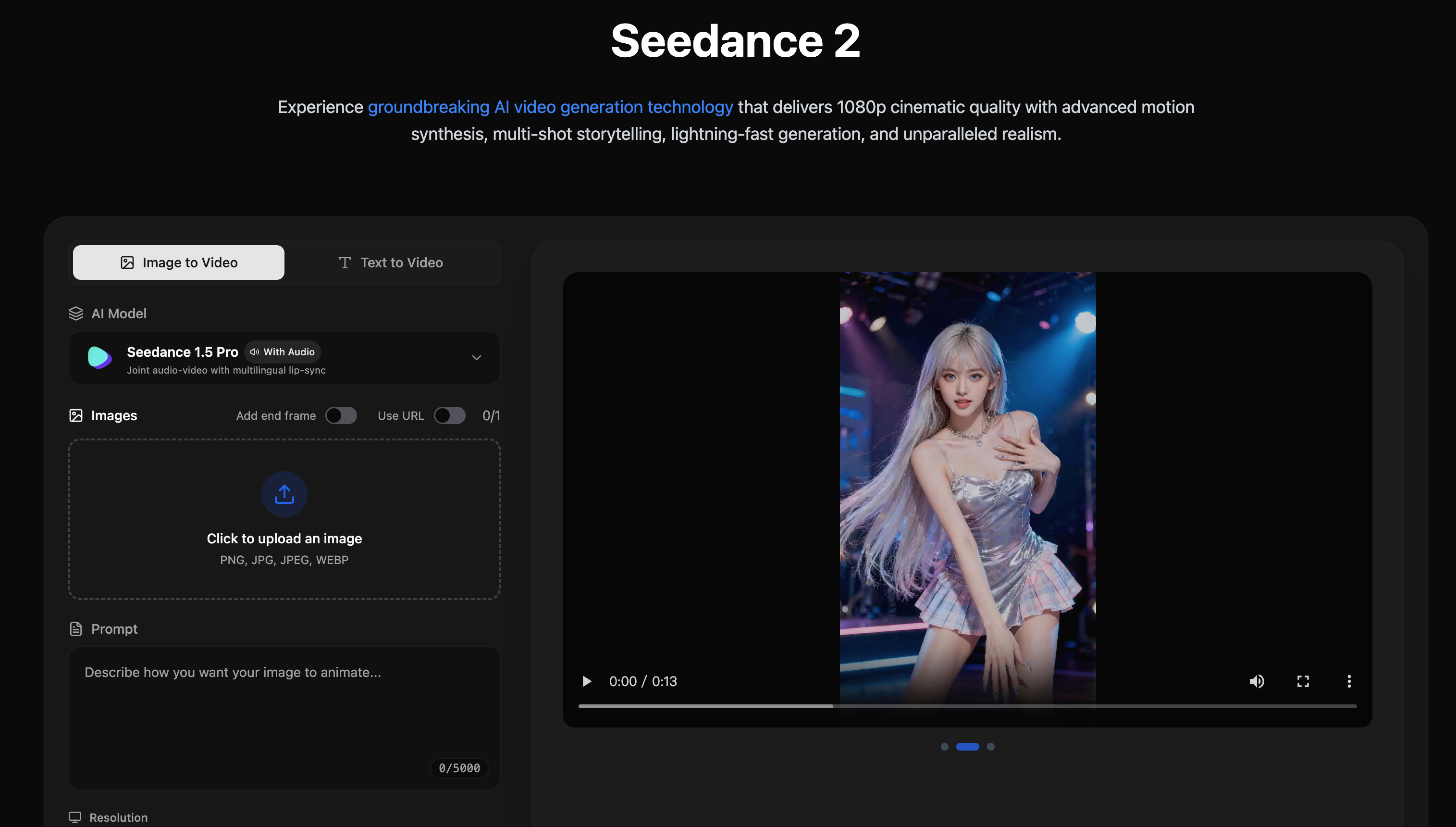
What is use of Seedance 2?
Seedance 2 helps you turn simple text or images into eye-catching videos using AI. With this Video Generator, you can make professional and creative clips fast without needing heavy video editing skills, ideal for content creators and marketers.
What is Seedance 2?
Seedance 2 is a powerful AI tool that works as an advanced Video Generator to create videos from text prompts and images. It uses smart algorithms to understand your instructions and produce rich, dynamic videos that include visuals, motion, and even synchronized audio. This means you can write a description like “a flying drone over a sunset city” and Seedance 2 will generate a video that matches your idea. Many creators choose Seedance 2 because it simplifies video creation and does not require technical editing skills.
What Can You Do With Seedance 2?
With Seedance 2 Video Generator, you can:
- Turn text into video: Describe a scene and the AI makes a video from your words.
- Animate images: Make still photos move in realistic ways.
- Add sound and lip sync: Your videos can include audio that matches the visuals.
- Create content fast: Videos are usually ready in under a minute, making it useful for social media, ads, or storytelling.
This makes Seedance 2 especially useful if you want to produce engaging video content without spending hours editing manually.
Key Features of Seedance 2
1. Text-to-Video Generation – Turn written descriptions into animated video clips using the Video Generator.
2. Image-to-Video Animation – Animate your pictures with motion that looks natural.
3. Realistic Sound Sync – Videos include audio that matches movement and voices.
4. Fast Generation – Most video outputs are ready in about 30-60 seconds.
5. Easy Downloads – Outputs are downloadable in standard formats like MP4.
6. Free and Paid Plans – Basic video creation is free, and paid subscriptions unlock higher quality and longer videos.
Benefits of Using Seedance 2
- Simple for Beginners: If you’re new to video creation, Seedance 2’s Video Generator lets you make videos with simple text or images.
- Saves Time: Instead of editing frame by frame, the AI produces complete videos fast.
- Boost Engagement: Videos are more engaging than text or photos alone, helping your content stand out.
- Flexible Use: Helps with marketing clips, social storytelling, fun animations, and educational videos.
- No Complex Software Required: You don’t need heavy software or skills—everything is handled by the AI.
Seedance 2 Pricing
Seedance 2 offers both free and paid options. The free plan lets you create many videos at basic quality without cost. Upgrading to paid plans gives you more credits, higher video quality, longer videos, and priority processing. Prices start from around $9.9 per month and go up depending on how many videos and credits you need.
Tips and Best Practices for Seedance 2
1. Use Clear Prompts: Write specific text prompts so the Video Generator understands your scene better (example: include setting, actions, mood).
2. Plan Your Scenes: Think ahead about video length and style to maximize credits in paid plans.
3. Test and Improve: Generate several versions with slightly different prompts to find the best output.
4. Match Use Case to Plan: If you need high-resolution or more videos per month, choose a plan that fits your needs.
FAQs about Seedance 2
1. What is Seedance 2 AI Video Generator?
Seedance 2 is an AI tool that turns text and images into creative videos quickly and easily.
2. Is Seedance 2 free to use?
Yes, Seedance 2 offers a free tier with basic features and video quality.
3. What kinds of videos can Seedance 2 make?
It can create short videos from text descriptions, animate images, and include sound.
4. Do I need to sign up to use Seedance 2?
Some versions allow fast access without signup, but logged-in accounts can save work and access higher-tier plans.
5. Can I use Seedance 2 videos for business?
Yes, generated videos can be used for marketing, social media, and commercial projects depending on the plan.
Key Platforms
Core Service Areas:

Multimedia Integration
Directed Outputs
User-Friendly Interface
Flexible Formats
Customizable Templates
Real-Time Collaboration
Pros
- High-quality visuals – Produces cinematic, sharp videos that look professional and polished.
- Multi-shot capability – Can generate sequences of scenes with continuity, not just single clips.
- Fast generation speed – Often creates videos quickly (seconds to a minute).
- Diverse styles supported – Works with different aesthetics like realistic, anime, and stylized looks.
- Intuitive prompt response – The Video Generator interprets instructions well when prompts are clear.
- Multiple aspect ratios & resolutions – You can create outputs for various platforms (1080p, different shape ratios).
- Watermark-free and exportable – Finished videos are clean and ready to share or publish.
- Saves time & workflow cost – Much faster than manual editing and cheaper than traditional production.
Cons
- Short maximum durations – Videos are often limited to brief clips (e.g., ~5–12 seconds), which can restrict storytelling.
- Credit-based cost – You pay per generation using credits, which can add up for heavy use.
- Prompt skill matters – If your text description isn’t clear, results may be average.
- Limited mobile support – No dedicated app for phones has been noted, which limits use on the go.
- Complex edits require extra tools – Post-generation editing (like audio mix or extended sequences) often needs external software.
- Some detailed motion limits – Very complex motion or multi-character scenes can show minor inconsistencies.
Frequently Asked Questions About Seedance 2
01
What types of media can Seedance 2 combine?
Seedance 2 can combine text, images, videos, and audio into a single directed output.
02
How do I get started with using Seedance 2?
To get started, simply sign up for an account on our website, and you can begin creating your projects by uploading your media and entering your desired text.
03
Is there a limit to the size or length of the media I can upload?
Yes, there are limits on file sizes and lengths based on your subscription plan. Please refer to the pricing page for specific details.
04
Can I export my projects in different formats?
Yes, Seedance 2 allows you to export your projects in various formats suitable for different platforms and uses.
05
Is Seedance 2 suitable for beginners with no technical skills?
Absolutely! Seedance 2 is designed to be user-friendly, making it accessible for users of all skill levels, including beginners.
Promote Seedance 2
Get Seedance 2 in front of thousands of buyers actively searching for AI tools. Feature your listing on the homepage and category pages, or add the verified badge to your site.
Copy Embed Code

Share on

Related AI Tools
Explore related AI tools for diverse applications and enhanced productivity
Unlock the best AI Tools for you!
Login or Approve this tool to continue exploring features and analytics.

