


The #1 All-in-One AI for Teachers. Helping you save time and improve student outcomes.
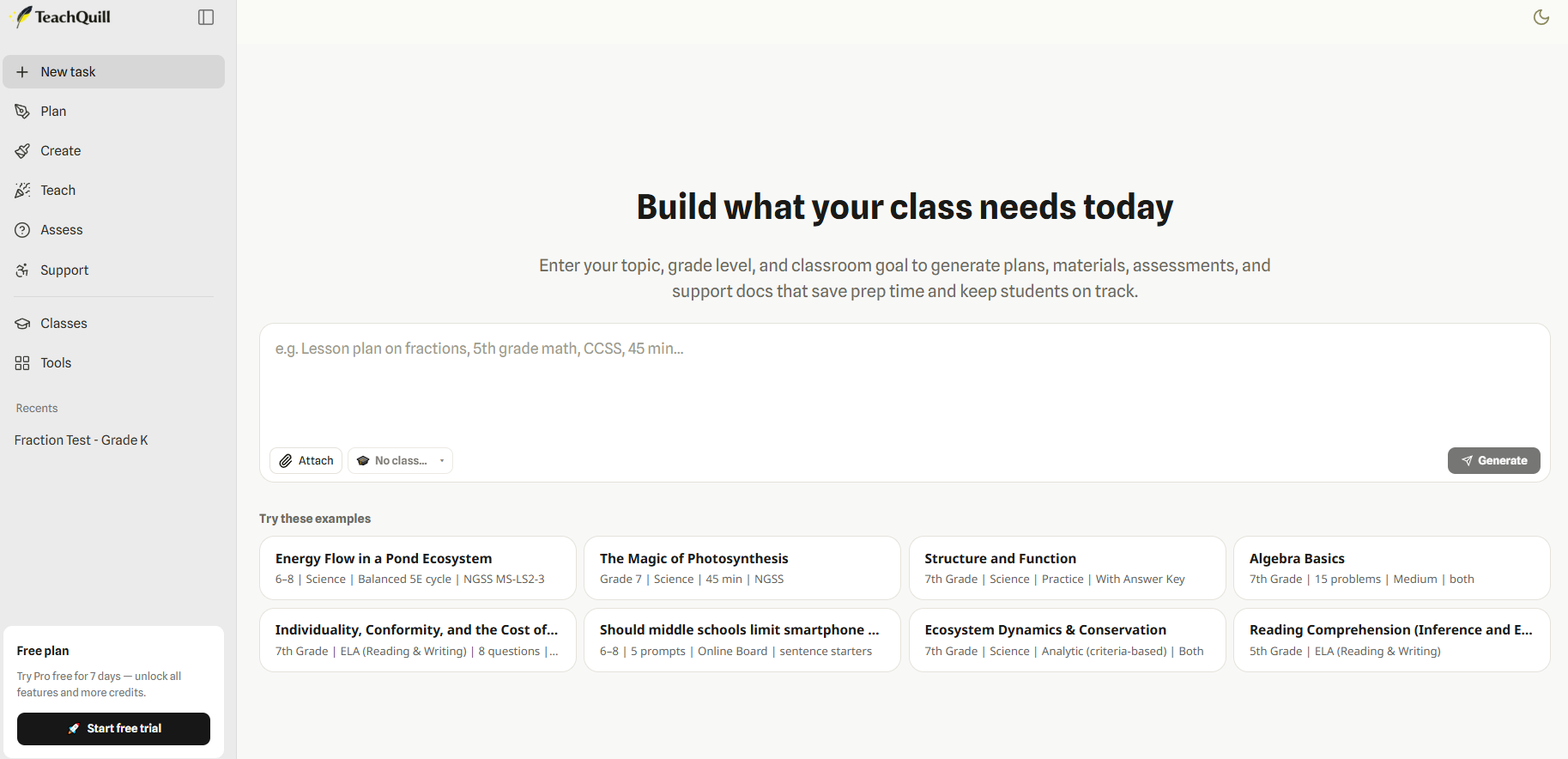
TeachQuill is an AI-powered teaching assistant platform designed for educators to simplify lesson planning, classroom preparation, and student engagement. The platform provides 100+ AI tools that help teachers generate lesson plans, worksheets, quizzes, rubrics, classroom activities, and differentiated learning materials in seconds. It supports K–12, ESL/ELL, SPED, and higher education environments, making it suitable for a wide range of educational needs.
Its AI chat assistant helps teachers select the right educational tool, generate customized teaching resources, edit results online, and export materials for classroom use efficiently.
TeachQuill Key Features
- 100+ AI Tools for Teachers: Access AI-powered tools for lesson planning, quizzes, worksheets, rubrics, and classroom activities.
- AI Lesson Plan Generator: Create structured and standards-aligned lesson plans within seconds.
- AI Chat Assistant: Helps teachers choose the right tool and generate tailored educational content based on classroom needs.
- Online Editing & Exporting: Edit generated teaching materials directly online and export them for classroom use.
- Support for Diverse Education Needs: Designed for K–12, ESL/ELL, SPED, differentiated instruction, and higher education.
Why use TeachQuill?
- Saves teachers significant time on lesson preparation.
- Simplifies worksheet, quiz, and rubric creation.
- Supports personalized and differentiated learning.
- Improves classroom productivity with AI automation.
- Helps educators create standards-aligned teaching resources quickly.
TeachQuill Pricing
TeachQuill offers subscription-based pricing plans with different levels of AI tool access, content generation limits, and premium educational features for teachers and institutions.
Is TeachQuill Free?
TeachQuill may provide limited free access or trial usage for educators, while advanced AI tools and premium features require a paid subscription plan.
Key Platforms
Core Service Areas:

Lesson Planning Assistant
Assessment Generator
Resource Recommendations
Student Progress Tracker
Interactive Learning Tools
Time-Saving Automation
Pros
- Large collection of AI tools built specifically for teachers.
- Speeds up lesson planning and classroom preparation.
- Supports quizzes, worksheets, rubrics, and classroom activities.
- Useful for K–12, ESL/ELL, SPED, and higher education.
- AI chat assistant improves workflow efficiency.
- Easy online editing and export functionality.
- Helps create personalized and differentiated learning materials.
- User-friendly platform for educators with minimal technical skills.
Cons
- Advanced features may require a paid subscription.
- AI-generated educational content may still require teacher review.
- Internet connection required for platform access.
- Some generated outputs may need manual customization.
- Learning curve for teachers unfamiliar with AI tools.
- Limited offline accessibility for classroom environments.
- Subscription pricing may not suit all individual educators.
- Dependence on AI could reduce manual lesson creativity for some users.
Frequently Asked Questions About TeachQuill
01
What features does TeachQuill offer to help teachers?
TeachQuill offers a range of features including lesson planning assistance, personalized student feedback, grading automation, and resource generation to streamline teaching processes and enhance student learning.
02
How does TeachQuill save time for educators?
TeachQuill automates repetitive tasks such as grading and feedback, allowing educators to focus more on teaching and student engagement rather than administrative duties.
03
Is TeachQuill suitable for all grade levels and subjects?
Yes, TeachQuill is designed to be versatile and can be used by teachers across various grade levels and subjects, making it a valuable tool for diverse educational settings.
04
Can TeachQuill be integrated with other educational tools?
TeachQuill offers integration capabilities with various educational platforms and tools, allowing for a seamless experience and enhanced functionality within your existing systems.
05
What kind of support is available for TeachQuill users?
TeachQuill provides comprehensive customer support including tutorials, FAQs, and direct assistance to help users maximize the benefits of the tool.
Promote TeachQuill
Get TeachQuill in front of thousands of buyers actively searching for AI tools. Feature your listing on the homepage and category pages, or add the verified badge to your site.
Copy Embed Code

Share on

Related AI Tools
Explore related AI tools for diverse applications and enhanced productivity
Unlock the best AI Tools for you!
Login or Approve this tool to continue exploring features and analytics.

