

Text to Speech.im is a valuable tool designed to convert written text into spoken audio, helping users generate natural-sounding speech from text documents effortlessly.
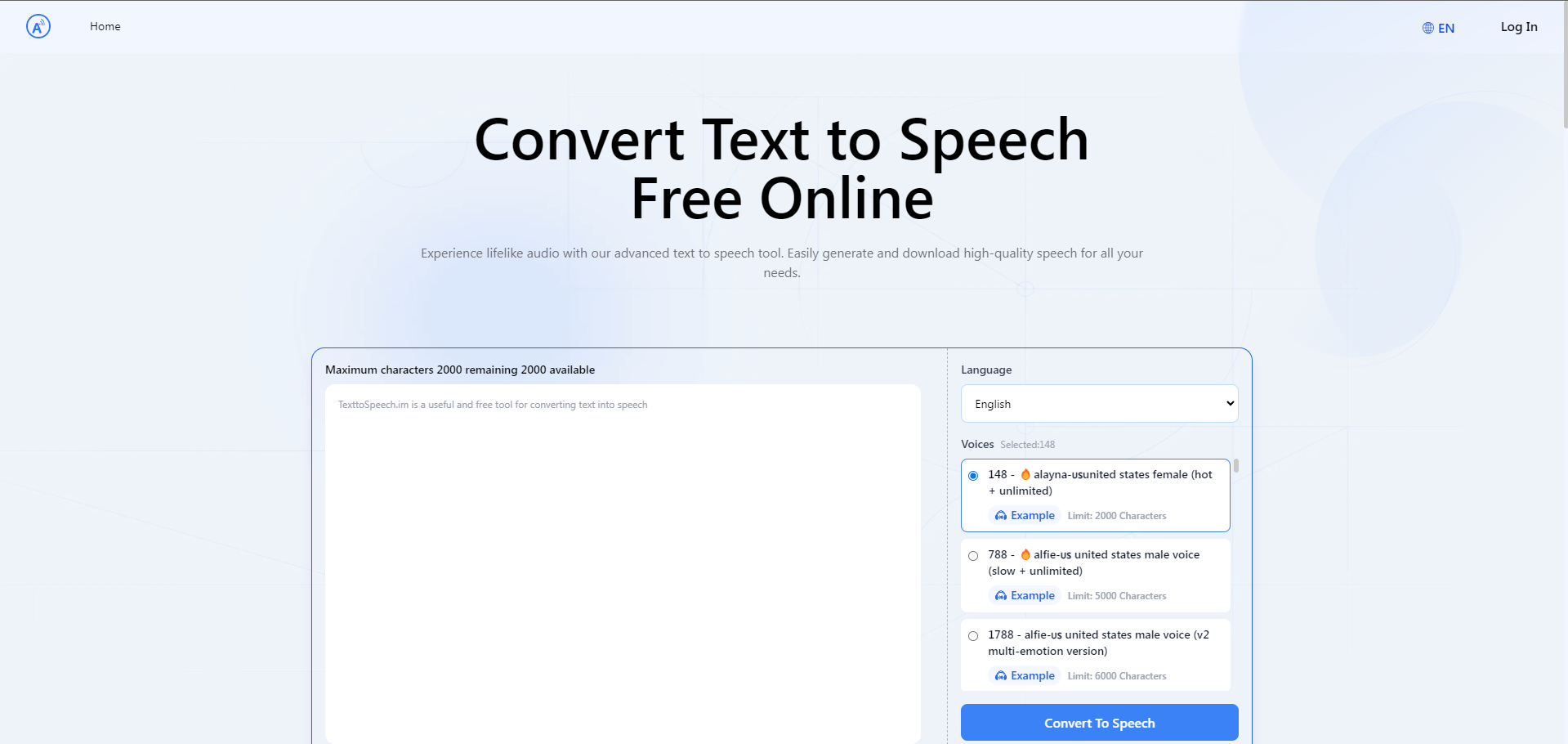
Text to Speech.im is an online platform that utilizes advanced text-to-speech (TTS) technology to transform text into natural-sounding voice outputs. This AI-driven service supports various languages and voice styles, allowing for customization such as adjusting the speech speed and volume to suit user preferences. The platform can generate high-quality MP3 files from text, making it a useful resource for content creators, educators, and anyone needing speech synthesis.
What Can You Do With Text to Speech.im?
With Text to Speech.im, users can input text and convert it into speech in various languages and vocal tones. The platform allows adjustments in speech parameters like speed and volume and offers a wide selection of voices, including gender-specific voices and even child voices across different accents and dialects. It also provides an option to download the generated speech as an audio file, suitable for various applications such as presentations, educational content, and accessibility features.
Key Features of Text to Speech.im
- Multiple Language Support: Offers extensive language options catering to global users.
- Variety of Voices: Includes a diverse range of voices, including options for male, female, and child voices in different accents.
- Customization Options: Users can customize the speed and volume of the speech output.
- High-Quality Audio Files: Generates downloadable MP3 files that maintain high audio quality.
- User-Friendly Interface: Simple and intuitive, facilitating quick text-to-speech conversions.
Benefits of Using Text to Speech.im
- Accessibility: Enhances accessibility for those with visual impairments or reading difficulties.
- Multilingual Support: Supports multiple languages, making it versatile for international use.
- Efficiency: Saves time and effort in converting text documents into audible formats.
- Customization: Allows for personalized speech output to match specific needs and contexts.
Pricing and Plans for Text to Speech.im
The service primarily offers a free model where users can generate speech within character limits for various voices. Each voice option specifies a character limit, ranging typically from 1000 to 5000 characters per conversion.
Tips and Best Practices for Using Text to Speech.im
- Optimize Text for Clarity: Simplify the text for better speech output.
- Preview Changes: Make use of the preview option to test different settings before finalizing the speech file.
- Explore Different Voices: Experiment with various voice options to find the one that best suits your content.
FAQs about Text to Speech.im
- How many languages does Text to Speech.im support?
Text to Speech.im supports multiple languages, offering a broad range for user selection. - Can I download the audio files generated by Text to Speech.im?
Yes, users can download high-quality MP3 files of the generated speech. - Is there a limit to how much text I can convert at once?
Yes, there are character limits for each voice, generally ranging from 1000 to 5000 characters per input. - Can I use Text to Speech.im for commercial purposes?
While specific details should be checked on their official platform, generally, TTS services like these can be used for various purposes, including commercial, depending on the terms of service.
Key Platforms
Core Service Areas:

Natural Voice Quality
Multiple Language Support
Customizable Speech Speed
User-Friendly Interface
Downloadable Audio Files
Text Formatting Options
Frequently Asked Questions About TexttoSpeech : Convert Text to Speech
01
What types of text can I convert using TexttoSpeech?
You can convert any type of written text, including documents, articles, and notes, into spoken audio using TexttoSpeech.
02
Is there a limit to the amount of text I can convert at once?
Yes, there may be a character limit for each conversion request. Please check the tool for specific limits.
03
What audio formats does TexttoSpeech support for downloading?
TexttoSpeech allows you to download your converted audio in various formats, typically including MP3 and WAV.
04
Can I choose different voices or accents for the speech output?
Yes, TexttoSpeech offers a selection of different voices and accents to customize the speech output according to your preferences.
05
Is TexttoSpeech free to use?
TexttoSpeech provides both free and premium options. Basic features are available for free, while advanced features may require a subscription.
Promote TexttoSpeech : Convert Text to Speech
Get TexttoSpeech : Convert Text to Speech in front of thousands of buyers actively searching for AI tools. Feature your listing on the homepage and category pages, or add the verified badge to your site.
Copy Embed Code

Share on

Related AI Tools
Explore related AI tools for diverse applications and enhanced productivity

Unlock the best AI Tools for you!
Login or Approve this tool to continue exploring features and analytics.

