

Wondershare Recoverit is an AI-assisted data recovery tool for Windows and macOS, built for SD card recovery, photo recovery, and video recovery. It helps users locate recoverable files faster with AI search, smart filtering, file preview, and guided recovery from cameras, GoPro devices, drones, drives, and other detectable storage.
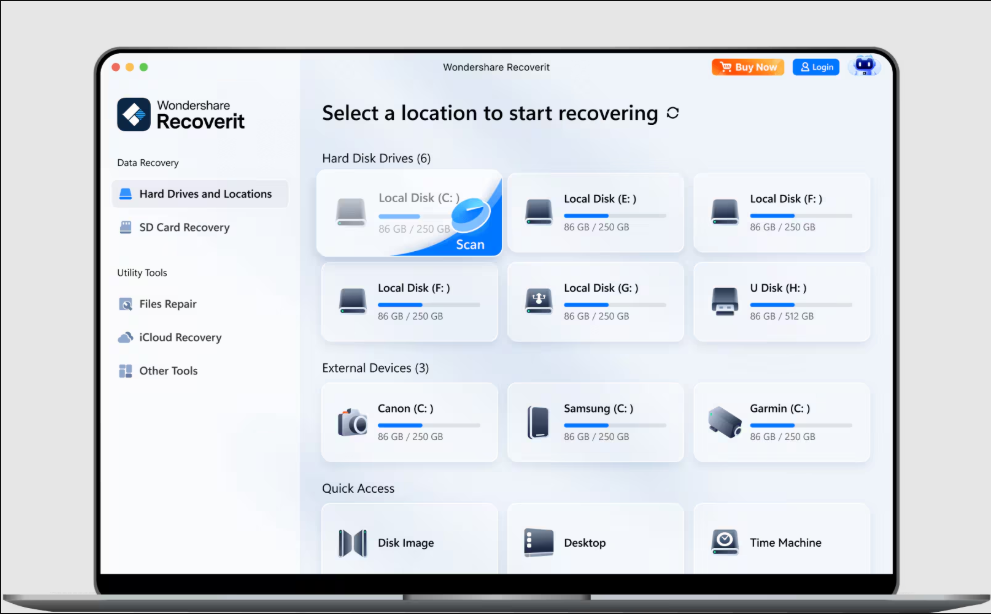
What is Wondershare Recoverit?
Wondershare Recoverit is an AI-assisted data recovery and file discovery tool for Windows and macOS. It helps users recover lost or deleted photos, videos, documents, audio files, and other data from computers, SD cards, memory cards, HDDs, SSDs, USB drives, cameras, GoPro devices, drones, and other detectable storage devices.
Recoverit combines deep scanning with AI-assisted search and filtering to help users locate specific files within large recovery results. Users can narrow results using details such as file type, size, source, and recovery status, making it easier to find important photos, videos, and documents without manually reviewing every scanned file.
What Can You Do with Wondershare Recoverit?
With Wondershare Recoverit, you can:
- Recover accidentally deleted or lost files.
- Restore photos, videos, documents, audio, and other file types.
- Recover data from SD cards, USB drives, HDDs, SSDs, cameras, and other storage devices.
- Search large scan results using AI-assisted file discovery.
- Filter recoverable files by type, size, source, and recovery status.
- Preview files before recovering them.
- Recover media from cameras, GoPro devices, and drones.
- Scan formatted or corrupted storage devices for recoverable data.
- Restore selected files to a different storage location.
- Perform data recovery on both Windows and macOS.
Key Benefits
Faster File Discovery: AI-assisted search and filtering help users quickly narrow large scan results and locate the files they need.
Wide Device Support: Recover files from computers, memory cards, external drives, cameras, drones, and other detectable storage devices.
Media Recovery: Recover lost photos and videos, making the software particularly useful for photographers, videographers, and content creators.
Preview Before Recovery: Check recoverable files before restoring them to avoid recovering unnecessary data.
Beginner-Friendly: A straightforward recovery workflow makes the software accessible even to users without advanced technical knowledge.
Flexible Recovery Options: Search and restore different types of lost data across a wide range of common data-loss situations.
Key Platforms
Core Service Areas:

Extensive File & Device Support
Patented Enhanced Video Recovery
AI-Powered Deep Scanning & Repair
Real-Time Previews & Instant Filtering
Pros
- Supports recovery of photos, videos, documents, audio, and other file types.
- Works with SD cards, memory cards, HDDs, SSDs, USB drives, cameras, drones, and other storage devices.
- AI-assisted search and filtering help locate specific files from large scan results.
- Allows users to preview recoverable files before restoring them.
- Particularly useful for photo, video, and SD card data recovery.
- Supports both Windows and macOS.
- User-friendly interface suitable for beginners and non-technical users.
- Advanced filtering by file type, size, source, and recovery status.
- Helps recover accidentally deleted, formatted, or otherwise lost files.
- Useful for photographers, video creators, businesses, and everyday users.
Cons
- Full file recovery may require a paid plan.
- Deep scans of large storage devices can take significant time.
- Successful recovery is not guaranteed for every deleted or damaged file.
- Recoverability depends on factors such as drive condition and whether lost data has been overwritten.
- Large scan results may still require manual review despite filtering tools.
- Advanced recovery features may be unnecessary for users with simple recovery needs.
- Pricing may be relatively high for users who only need one-time data recovery.
- Severely physically damaged storage devices may require professional recovery services instead of software.
Frequently Asked Questions About Wondershare Recoverit AI Data Recovery
01
How does AI technology enhance data recovery in Recoverit?
Recoverit uses neural-network mapping and AI file-signature analysis to scan unallocated drive sectors, auto-stitch fragmented 4K/8K video clips, and reconstruct damaged file headers with high precision.
02
What is Patented Enhanced Video Recovery?
It is a specialized feature that automatically scans, aligns, and merges scattered video fragments from camera SD cards (Canon, Sony, GoPro, DJI), preventing unplayable or broken video outputs.
03
Is there a file limit on Recoverit’s free version?
The free version offers unlimited scanning, real-time file previews, and up to 500MB of free data recovery before requiring a license upgrade.
Promote Wondershare Recoverit AI Data Recovery
Get Wondershare Recoverit AI Data Recovery in front of thousands of buyers actively searching for AI tools. Feature your listing on the homepage and category pages, or add the verified badge to your site.
Copy Embed Code

Share on

Related AI Tools
Explore related AI tools for diverse applications and enhanced productivity

Unlock the best AI Tools for you!
Login or Approve this tool to continue exploring features and analytics.

