

Phraser is a web-based application that allows users to create and share images with artificial intelligence (AI). It is designed for collaborative use of AI by artists, designers, marketers, and other creative professionals. Phraser has several features that make it a unique and powerful tool for generating and editing images with AI.
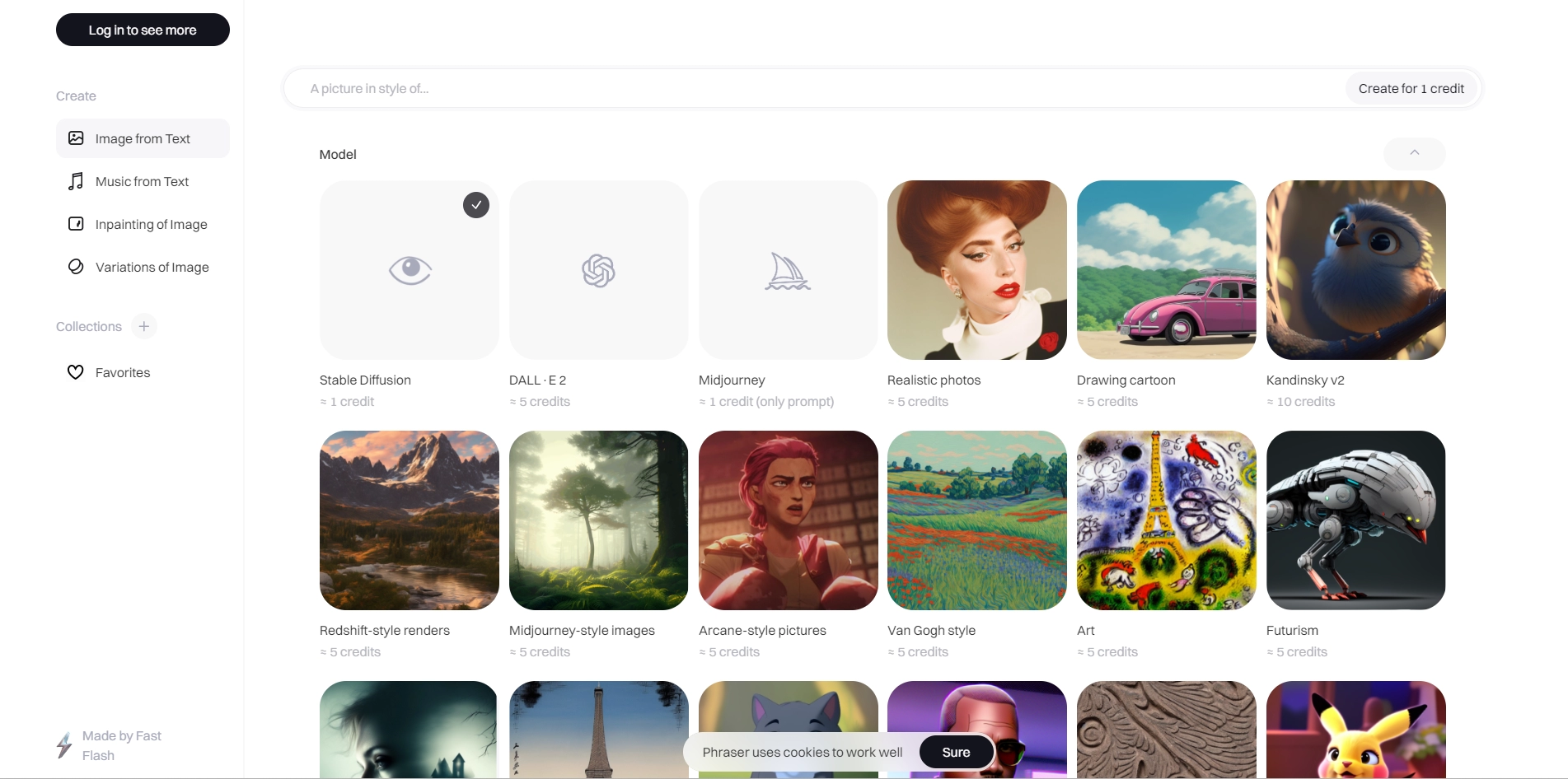
One of the main features of Phraser is its collection of AI models that can generate images from text prompts. Users can choose from over 40 models, including Stable Diffusion, DALL·E 2, Midjourney, and many others. Each model has its own style and capabilities, and users can experiment with different prompts to see what the AI can create. Users can also use Phraser's prompt builder to write better prompts for neural networks and get suggestions and feedback from the app.
Another feature of Phraser is its ability to create variations of images and edit them with inpainting. Users can generate multiple versions of an image with different colors, shapes, details, and styles. They can also use inpainting to erase or fill in parts of an image with AI. This allows users to fine-tune their creations and explore new possibilities.
Phraser also has a feature for collecting and sharing images with others. Users can create collections of their favorite images or browse through collections made by other users. They can also search through millions of generated images by keywords or categories. Users can share their images and collections with their team members or with the Phraser community of creatives.
Phraser offers different pricing plans for different levels of usage and access to features. Users can start for free with 100 credits for creations per month, or choose from four paid plans: Basic ($2/month), Blue ($7.98/month), Expert ($11/month), or Pro ($16/month). Each plan gives users more credits for creations, more available models, and more features such as variations, inpainting, and private mode.
Phraser is the leading app for collaborative use of AI. It helps users turn their ideas into reality in seconds with Phraser's image generator online. It also provides users with inspiration, feedback, and visibility in the community of creatives. Phraser is trusted by over 70,000 users from various industries and backgrounds. Phraser is the ultimate tool for anyone who wants to create cool images with AI.
Key Platforms
Core Service Areas:

Collaborative Creation
Intuitive Interface
Customizable Outputs
Image Sharing
Diverse Styles
AI Editing Tools
Pros
- Phraser offers a variety of AI models to choose from, such as Stable Diffusion, DALL·E 2, Midjourney, and others.
- Phraser provides inspiration and prompts for users to generate images from text or edit existing images .
- Phraser has a community of creatives who share their collections and creations with others .
- Phraser has affordable pricing plans that suit different needs and budgets.
- Phraser measures the aesthetics level of generated images and automatically makes them better.
Cons
- Phraser requires an internet connection to work, which may limit its accessibility and reliability.
- Phraser may not be able to generate images that match the user's expectations or preferences every time.
- Phraser may raise ethical and legal issues regarding the ownership and use of AI-generated images.
Frequently Asked Questions About Phraser
01
What is Phraser and how does it work?
Phraser is a web-based application that leverages artificial intelligence to help users create and share images. Users can input specific prompts or ideas, and Phraser generates images based on those inputs, allowing for collaborative creativity among artists, designers, and marketers.
02
Who can benefit from using Phraser?
Phraser is designed for a wide range of creative professionals, including artists, designers, marketers, and anyone interested in generating unique visuals using AI. Its collaborative features make it particularly useful for teams and projects requiring input from multiple users.
03
What are the key features of Phraser?
Key features of Phraser include AI-generated image creation, collaborative sharing capabilities, intuitive editing tools, and a user-friendly interface that allows for easy navigation and manipulation of generated images.
04
Is there a cost associated with using Phraser?
Phraser offers various pricing plans, including a free trial option. Users can choose from different subscription levels depending on their needs and the extent of features they wish to access.
05
How can I share my creations with others using Phraser?
Phraser allows users to easily share their generated images through built-in sharing options. You can invite collaborators to view or edit your creations, or share directly to social media platforms or via links.
Promote Phraser
Get Phraser in front of thousands of buyers actively searching for AI tools. Feature your listing on the homepage and category pages, or add the verified badge to your site.
Copy Embed Code

Share on

Related AI Tools
Explore related AI tools for diverse applications and enhanced productivity

Unlock the best AI Tools for you!
Login or Approve this tool to continue exploring features and analytics.

