

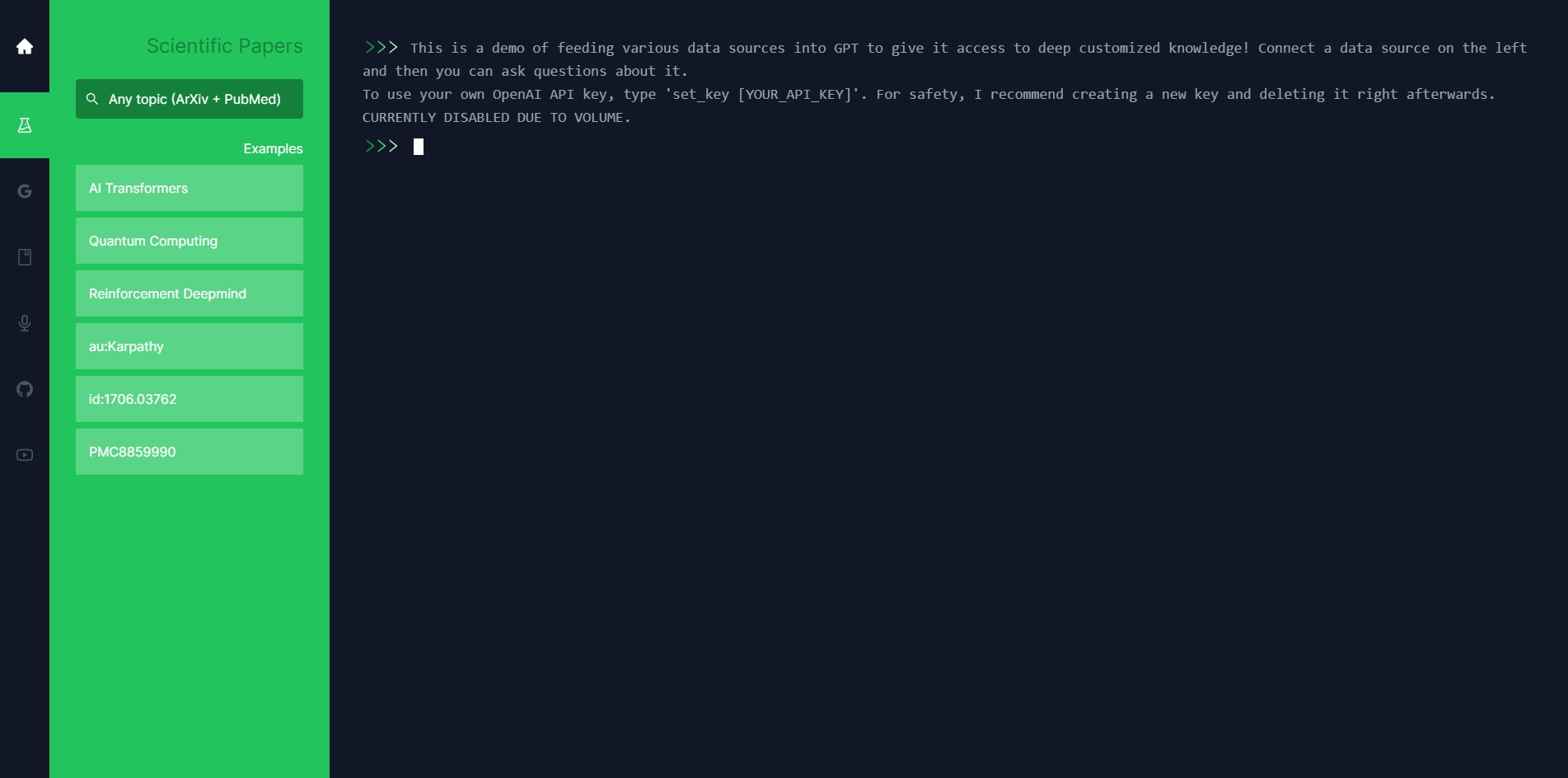
If you are interested in learning how to use GPT to answer questions about various data sources, such as scientific papers, Google Docs, GitHub repositories, and more, you might want to check out the demo of PapersGPT created by Jesse Zhang. PapersGPT is a web app that allows you to connect a data source on the left and then ask questions about it on the right. The app uses OpenAI's API to query GPT with the data source and generate answers in a terminal-themed interface. You can also use your own OpenAI API key if you want to try it out.
Jesse Zhang is a software engineer and entrepreneur who founded Lowkey, a gaming startup that was acquired by Niantic in 2021. He now works on the social team at Niantic and is also involved in some funds via Sequoia Scouts and Neo. He has a background in engineering (primarily web and ML) and math, and he studied Computer Science at Harvard. He also likes playing basketball, tennis, board games, and video games (he hit Grandmaster in Teamfight Tactics). He also wrote a problem on the 2021 AMC 10. He has a personal website where he showcases some of his cool projects and experiments with various technologies.
In this blog post, I will give you a brief overview of how PapersGPT works and what kinds of questions you can ask it. I will also show you some examples of the data sources and the answers that PapersGPT can generate. If you want to learn more about PapersGPT or Jesse Zhang, you can visit his website at https://jessezhang.org/llmdemo or follow him on Twitter at @thejessezhang.
Key Platforms
Core Service Areas:

Data Source Integration
Interactive Q&A
Custom API Usage
Terminal-Themed Interface
Multi-Source Queries
Real-Time Answers
Pros
- It is a demo of feeding various data sources into GPT to give it access to deep customized knowledge.
- It supports different types of data, such as scientific papers, Google Docs, GitHub repos, etc.
- It has a terminal-themed Q&A interface that allows users to ask questions about the data source and get answers from GPT.
- It is a creative and educational project that showcases the potential of GPT and natural language processing.
Cons
- It requires users to have their own OpenAI API key, which may not be easy or affordable for everyone.
- It may not be able to answer all questions accurately or comprehensively, depending on the quality and quantity of the data source and the limitations of GPT.
- It may pose some ethical or legal issues if users feed sensitive or copyrighted data into GPT and share the answers publicly.
Frequently Asked Questions About Papers GPT
01
What types of data sources can I use with Papers GPT?
You can use various data sources such as scientific papers, Google Docs, GitHub repositories, and more.
02
Do I need an OpenAI API key to use Papers GPT?
You can use the demo without an OpenAI API key, but if you want to try it out with your own data or preferences, you can enter your own OpenAI API key.
03
How do I connect a data source in the Papers GPT app?
To connect a data source, simply select it from the options on the left side of the interface, and then you can start asking questions about it on the right.
04
What kind of questions can I ask Papers GPT?
You can ask a wide range of questions related to the content of the connected data source, including summaries, explanations, and specific details.
05
Is there a limit to the size of the data source I can use?
While the specific limits may vary, generally larger data sources may take longer to process, so it's best to start with manageable sizes for optimal performance.
Promote Papers GPT
Get Papers GPT in front of thousands of buyers actively searching for AI tools. Feature your listing on the homepage and category pages, or add the verified badge to your site.
Copy Embed Code

Share on

Related AI Tools
Explore related AI tools for diverse applications and enhanced productivity
Unlock the best AI Tools for you!
Login or Approve this tool to continue exploring features and analytics.

